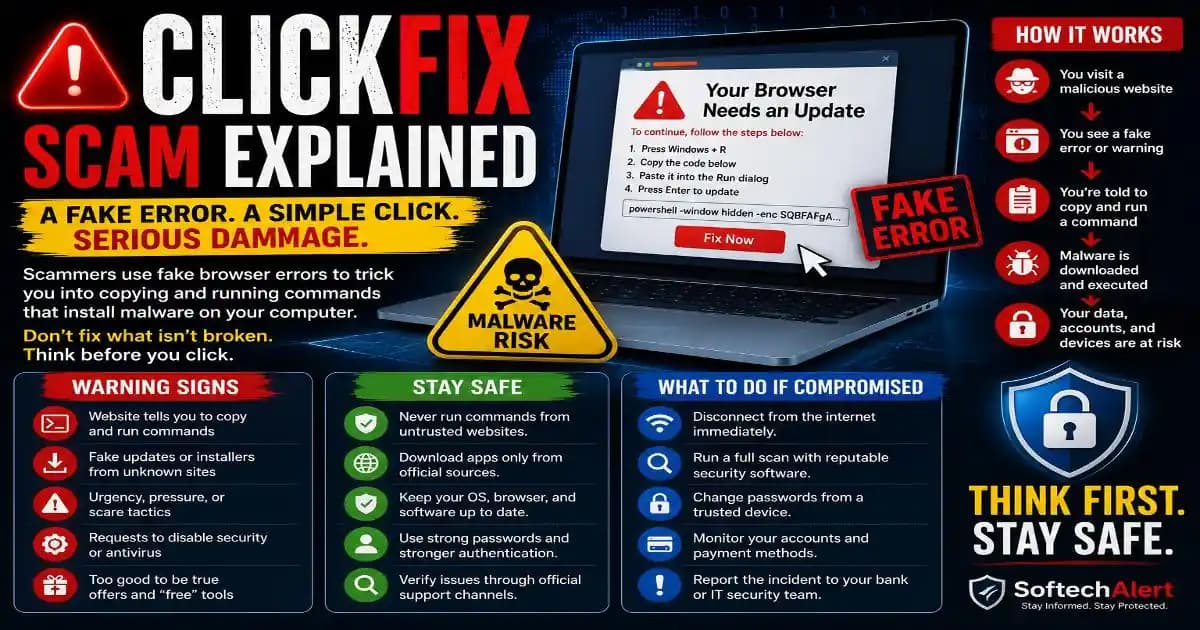
ClickFix scam attacks are designed around a surprisingly simple idea: instead of forcing malware onto your computer, attackers persuade you to help install it yourself.
You might visit a webpage and suddenly see a Message saying that your browser needs an update, a video cannot play, a security check failed, or an error needs to be fixed. The page may look professional enough to seem legitimate.
Then comes the important part. Instead of simply asking you to download an update, the page gives you instructions. You may be told to press a keyboard shortcut, open a system utility, copy some text, and paste it somewhere on your computer.
That is the trap.
Google's security teams have documented ClickFix campaigns using fake browser-update lures to distribute malware, while Google Threat Intelligence has also observed attackers abusing trusted AI-service infrastructure to host deceptive instructions designed to make victims copy and paste malicious commands. ([blog.google][1])
What Is a ClickFix Scam?
A ClickFix scam is a social-engineering technique in which a victim is shown a fake technical problem and then manipulated into performing an action that helps the attacker execute malicious code.
The name comes from the basic promise presented to the victim: click here, follow these instructions, and the problem will be fixed.
Unlike a traditional malicious download, the attacker tries to make the victim believe that the suspicious action is part of normal troubleshooting.
The fake problem can take many forms. A page may claim that your browser is outdated, a security verification failed, a document cannot be opened, a video requires an update, or your computer needs a special component.
The exact message changes, but the underlying strategy remains similar: create a believable problem, provide a convenient solution, and make the victim execute the dangerous step.
How the ClickFix Attack Works
The attack often begins with something that does not immediately look dangerous. You might click an advertisement, follow a compromised webpage, open a link from a message, or arrive at a malicious page through a search result.
The page then displays a convincing error or verification screen.
Instead of downloading a normal installer, the page may instruct you to copy a command or script. The instructions can be disguised as technical troubleshooting and may include familiar terms associated with Windows, macOS, browsers, or security tools.
The victim is then encouraged to paste the copied content into a system utility such as a terminal or command interface.
Once the command is executed, it can download or launch additional malicious software.
Google Threat Intelligence described campaigns where attackers created realistic troubleshooting instructions and attempted to persuade users to paste malicious commands into system terminals. In one observed campaign, the resulting malware targeted information such as browser data, cryptocurrency wallets, system information, and files. ([Google Cloud][2])
Why a Fake Browser Error Is So Effective
The most interesting part of ClickFix is that the browser warning does not necessarily have to be technically convincing. It only needs to be believable enough for the user to accept the proposed solution.
People are accustomed to software asking them to update something, verify a setting, install a component, or restart an application.
That familiarity works in the attacker's favor.
A message such as “Your browser needs an update” sounds ordinary. A warning about a missing security component sounds technical. A fake CAPTCHA that claims you must complete another verification step can also feel familiar.
The attacker is exploiting a knowledge gap rather than a software vulnerability. The victim becomes the mechanism that authorizes the next stage of the attack.
The Most Important Warning Sign: A Website Tells You to Run a Command
One of the strongest signals is an unexpected instruction to copy text from a webpage and paste it into a terminal, PowerShell window, Run dialog, or another system utility.
Ordinary websites generally do not need you to execute an unknown command just to prove that you are human, fix a browser problem, watch a video, or complete a routine verification.
That does not mean every command shown Online is malicious. Developers, system administrators, and technical users routinely use command-line instructions. The difference is context.
If an unfamiliar webpage suddenly tells a nontechnical user to paste a command into a system tool, stop and verify the instruction independently before doing anything else.
Why Copy-and-Paste Makes ClickFix Different
Copy-and-paste feels safer than downloading an executable file because there is no obvious installer. That perception is exactly what attackers can exploit.
The command itself may be hidden behind ordinary-looking text or instructions. A victim may never understand what the command does before executing it.
Once the command runs, built-in system utilities can potentially download another payload or perform other actions. This can make the initial step look less suspicious than a traditional malware executable.
The technique also benefits from user trust. The victim has technically initiated the action, which means the attack is partly disguised as normal computer troubleshooting.
ClickFix Is Not Just a Fake Chrome Update
Fake browser updates are one common lure, but ClickFix-style attacks are broader than a single browser.
A malicious page could imitate an error associated with Chrome, Edge, Firefox, Windows, macOS, a PDF viewer, a meeting application, or another familiar piece of software.
Attackers can also adapt the message to current online behavior. Google Threat Intelligence has reported ClickFix activity involving deceptive instructions hosted through public sharing features of AI services, showing how attackers can use trusted platforms as part of the social-engineering chain. ([Google Cloud][2])
That evolution matters because users are learning to trust AI assistants and other familiar online services. A malicious instruction can become more convincing when it appears alongside a recognizable brand or trusted domain.
What You Should Do When a Browser Shows a Strange Error
If a webpage suddenly claims that something is wrong with your browser or computer, do not follow its troubleshooting instructions immediately.
- Stop before copying anything. Do not paste commands into a terminal, PowerShell, Run dialog, or other system utility simply because a webpage tells you to.
- Close the suspicious page. If the page keeps displaying warnings, close the browser tab or window rather than interacting with additional buttons.
- Update software normally. If your browser really needs an update, use its built-in update mechanism or navigate directly to the official vendor website.
- Verify the problem independently. Search the official support documentation for the claimed error rather than trusting instructions displayed by the suspicious webpage.
- Scan the device if you already executed something. Use reputable security software and investigate unexpected applications, processes, browser extensions, or account activity.
The most important point is that a webpage should not become your system administrator simply because it displays a convincing warning.
What If You Already Ran the Command?
If you already followed a ClickFix-style instruction and executed an unknown command, do not assume that nothing happened just because the webpage disappeared.
Disconnecting the Device from the internet can be a sensible precaution when you have strong reason to believe malware may have executed. Then use reputable security software to inspect the system and consider getting professional assistance if the computer contains sensitive business or personal information.
Review recently installed applications, browser extensions, startup items and unusual system behavior. If you entered passwords after the suspected infection, change important credentials from a trusted device and enable stronger authentication where available.
For business devices, report the incident to the organization's IT or security team rather than attempting to hide it. Early reporting can help prevent a single compromised device from becoming a larger security problem.
Why ClickFix Is a Digital Skills Problem Too
ClickFix demonstrates an important change in cybersecurity. Users no longer need to download an obviously suspicious file to become part of an attack.
They may simply need to believe a fake explanation.
That makes digital skills increasingly important. Knowing how to distinguish an official update from a webpage's unsolicited instruction, understanding what a terminal command can do, and recognizing suspicious urgency can prevent an infection before security software ever has to respond.
The best defense is not memorizing one particular warning message. It is learning to question the action a website wants you to perform.
If a webpage tells you to install something, disable security protections, open a system utility, or copy and execute an unknown command, stop. Verify the problem through an independent source.
That small pause breaks the ClickFix attack chain.
ClickFix Works Because the “Fix” Looks Helpful
The most dangerous part of a ClickFix scam is not the fake error itself. It is the moment when the victim believes the attacker is offering a solution.
A browser warning can be dismissed. A strange webpage can be closed. But once a user willingly executes an unknown command, the situation can become much more serious.
Remember the simple rule: never run a command from an unexpected webpage just because it claims to fix a browser or computer problem.
Use official update mechanisms, verify unusual instructions independently, keep security software active, and treat unexpected copy-and-paste commands as a major warning sign.
ClickFix is a reminder that modern malware campaigns do not always begin with a suspicious file. Sometimes they begin with a perfectly ordinary-looking error message and a helpful-looking “Fix” button.