App data collection can reveal much more about your habits than you might expect when you install an ordinary app, accept its permissions, and start using it on your phone.
Consider a familiar situation. You install a free shopping, fitness, photo-editing, travel, or productivity app. It asks for access to notifications, location, photos, contacts, or Device information. You may approve the requests quickly because you want to reach the main feature. Nothing appears unusual, yet the app may gradually build a detailed picture of how you use your device.
That does not automatically mean the app is malicious. Data collection is a normal part of many digital services. Apps need certain information to provide features, prevent abuse, personalize experiences, measure performance, or support advertising. The important question is not simply whether an app collects data, but what it collects, why it needs it, how long it keeps it, and who can access or receive it.
App Data Collection Is More Than What You Enter
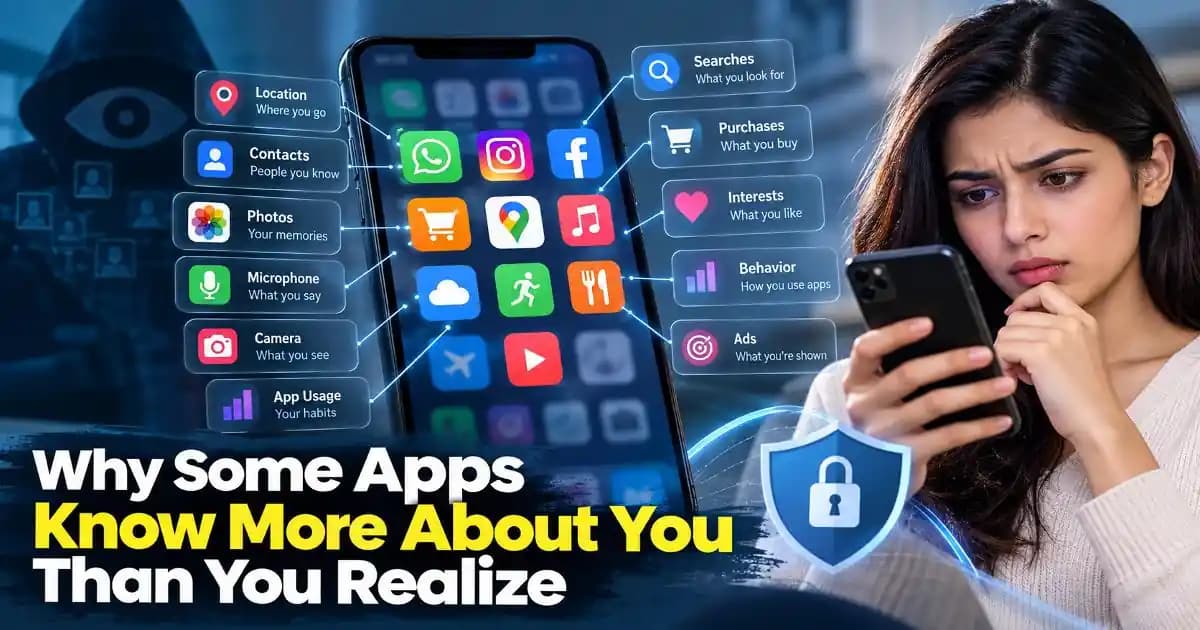
Many people think of personal data as information they deliberately provide, such as their name, email address, phone number, or profile photo. Modern apps can learn much more from normal usage.
An application may observe information connected to your device, approximate location, language, operating system, browser or app version, network characteristics, and interaction patterns. Depending on the service and permissions involved, it may also process information about your searches, purchases, viewed content, clicks, or preferences.
Even when individual pieces of information seem harmless, combining them can make them much more revealing. An app may not need to know exactly who you are to infer that you frequently travel, shop for a particular type of product, work unusual hours, or regularly use certain services.
This is one reason privacy protection is increasingly about understanding patterns rather than simply hiding obvious personal details.
Why Apps Ask for So Many Permissions
Permissions are one of the clearest places where users can see what an app wants to access. Android and Apple provide permission systems that allow users to control access to sensitive resources such as location, contacts, microphones, cameras, photos, and notifications.
The difficult part is deciding whether a permission makes sense for the feature you are using.
A navigation app reasonably needs location access. A video-calling application may need the camera and microphone during a call. A photo editor may need access to selected images. But if a simple utility requests access to contacts, precise location, and the microphone without an obvious reason, that deserves closer attention.
A permission request is not proof that an application is unsafe. It is a signal to pause and consider whether the requested access matches the app's purpose.
Modern mobile operating systems also provide more granular controls than they once did. Depending on the device and operating system version, you may be able to allow access only while an app is being used, select specific photos, or deny access entirely.
How Apps Can Learn About Your Behavior
The most interesting part of app data collection is often not a single permission but the combination of many signals.
Imagine that a user regularly opens a food delivery app around the same time each evening, searches for restaurants in a particular area, saves certain meals, and repeatedly interacts with promotional offers. None of those actions necessarily identifies the person by itself. Together, however, they can create a useful behavioral profile.
Analytics systems are designed to understand these patterns. Businesses use analytics to determine which features people use, where users encounter problems, which screens receive attention, and whether changes to an application improve engagement.
Advertising and personalization systems can use related information to make recommendations or select advertisements. The exact practices differ between companies and products, which is why privacy policies and permission settings matter.
This also explains why an advertisement or recommendation can sometimes feel surprisingly relevant. The system may not be listening to private conversations as people sometimes assume. It may simply have enough behavioral signals to make a surprisingly accurate prediction.
App Data Collection Does Not Always Mean Someone Is Watching You
Privacy discussions can become confusing when ordinary analytics, advertising, tracking, and malicious surveillance are treated as the same thing.
They are not.
A legitimate analytics system may record events such as an app opening, a button being selected, or a feature failing. An advertising system may use identifiers and behavioral information to personalize promotions. A malicious application, on the other hand, may attempt to obtain sensitive information without meaningful user consent or abuse permissions for harmful purposes.
Understanding this difference helps users make better decisions without becoming unnecessarily suspicious of every application.
At the same time, legitimate data collection can still raise privacy concerns. A company can collect information lawfully while users remain uncomfortable with how much information is being gathered or how it is being used. Privacy is therefore not only a security issue. It is also a question of control, transparency, and reasonable expectations.
Why Free Apps Can Still Have a Business Model
When an app costs nothing to download, users sometimes wonder how the developer makes money. There is no single answer.
Some applications earn revenue through subscriptions, paid upgrades, advertising, transactions, or business customers. Others use data and analytics as part of their product strategy. A free app can therefore be perfectly legitimate while still collecting information about usage.
The important distinction is between understanding the business model and assuming that free automatically means unsafe.
Before installing an unfamiliar application, it is useful to look at the developer, the app's stated purpose, its recent updates, privacy information, and the permissions it requests. On official app stores, these signals can help users identify obvious inconsistencies.
What Users Should Check Before Trusting an App
You do not need to become a privacy expert every time you install an application. A few habits can make a meaningful difference.
Start by checking whether the requested permissions make sense. If the app provides a feature that clearly requires access, the request may be reasonable. If the relationship is unclear, deny the permission initially and see whether the app actually needs it.
Review permissions periodically rather than treating the installation decision as permanent. Apps change over time, and you may stop using features that originally required access.
Also pay attention to privacy settings inside the app itself. Some services provide controls for personalization, advertising preferences, location history, account activity, or data sharing. These settings can be separate from the operating system's permission controls.
For sensitive accounts, combine privacy awareness with strong account security. Use unique passwords, enable multi-factor authentication where appropriate, and review unexpected login notifications.
Privacy Problems Can Start With Ordinary Habits
Not every privacy issue requires a sophisticated attack. Sometimes the problem is simply excessive access accumulated over time.
A user may have dozens of apps installed, many with access that was granted months or years ago. Some applications may no longer be used at all. Others may have changed ownership, features, or privacy practices.
This is why a periodic permission review is useful. Remove applications you no longer need, revoke unnecessary permissions, and review which services have access to sensitive account information.
Be particularly careful with apps installed outside official ecosystems. Sideloaded applications can have legitimate uses, especially for advanced users and developers, but they also increase the importance of verifying the source and understanding what software is being installed.
AI Apps Make the Question Even More Important
The growth of AI tools adds another layer to the privacy conversation. AI applications may process prompts, uploaded documents, images, recordings, code, or other information submitted by users.
That does not mean every AI tool misuses private information. It means users should understand what they are submitting and review the service's data controls before uploading sensitive material.
A useful rule is simple: do not paste confidential business information, passwords, private documents, financial details, or personal records into an AI tool unless you understand how that service handles the information and have permission to use it there.
The same principle applies to productivity apps, cloud platforms, remote work tools, and online utilities. Convenience often depends on data processing, so the goal is not to eliminate data use but to make informed choices about it.
Better Privacy Comes From Better Digital Habits
Understanding app data collection does not require avoiding modern technology. It requires becoming more deliberate about what you install, what you permit, and what you share.
When an app asks for access, stop for a moment and ask whether the request matches the feature. When a service offers a privacy control, understand what it changes. When an unfamiliar application requests unusually broad access, investigate before approving it.
These small decisions matter because personal information rarely exists as one isolated piece of data. Location, device details, usage patterns, account activity, searches, purchases, and interactions can become meaningful when combined.
The practical goal is not to make your phone completely invisible. That is rarely realistic. The goal is to reduce unnecessary exposure while continuing to use the apps and services that genuinely provide value.
As apps become more personalized and AI-powered, understanding how information moves through the software you use will become an increasingly important digital skill. Privacy is no longer only a setting buried inside an application. It is part of making informed decisions about the technology you use every day.
Frequently Asked Questions
Can an app collect data even when I do not actively use it?
Some apps can perform background activity depending on their permissions, operating system rules, and design. Reviewing background permissions and restricting unnecessary access can reduce unwanted data exposure.
Does denying an app permission make it unsafe?
No. Denying a permission simply prevents the app from accessing that resource. Some features may stop working if the permission is genuinely required.
Should I delete apps I no longer use?
Yes, especially if an app has access to sensitive information. Removing unused applications reduces the number of services that remain connected to your device.
Are free apps automatically collecting too much information?
No. Free apps can use many legitimate business models. Instead of judging an app by price, examine its developer, permissions, privacy practices, and purpose.
Should I avoid putting private information into AI tools?
For sensitive information, caution is appropriate. Review the AI service's privacy and data controls before submitting confidential documents, credentials, financial information, or private records.