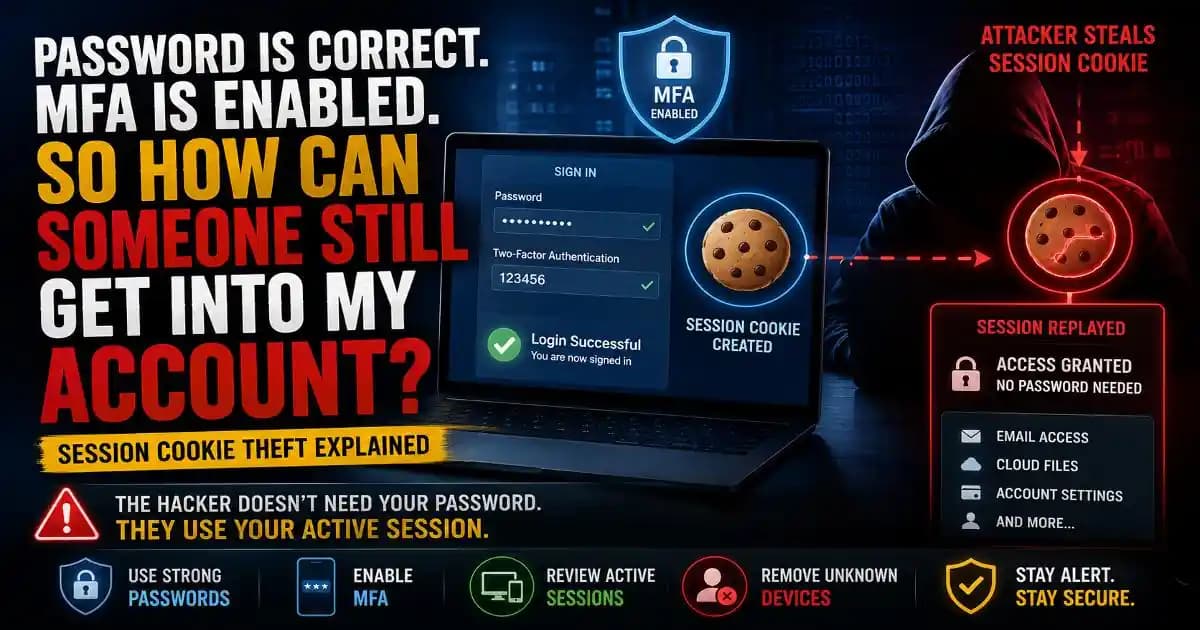
Session cookie theft can explain one of the most confusing account-security situations: your password is correct, multi-factor authentication is enabled, and yet someone appears to access your account without asking you for another verification code. The explanation is that logging in and staying logged in are not exactly the same thing.
After you successfully authenticate to a website, the service normally creates an authenticated session so you do not have to enter your password and complete MFA every time you open another page. A browser session cookie can act as evidence that this authentication already happened. If an attacker obtains a usable session cookie, they may be able to replay that session and appear to the service as an already authenticated user.
Microsoft has documented adversary-in-the-middle phishing attacks that steal session cookies after users complete authentication, allowing attackers to access accounts without repeating the normal sign-in process. The technique is especially important because it does not require breaking MFA cryptography itself; the attacker is targeting the authenticated session created after MFA succeeds.
What is session cookie theft?
A session cookie is a piece of information stored by a browser that helps a website remember an authenticated session. Without session management, you would have to prove your identity repeatedly as you moved around a website.
After you enter your credentials and complete the required authentication checks, the service can issue a session identifier or related token. Your browser sends that information back when you make subsequent requests, allowing the service to recognize the active session.
Session cookie theft happens when an attacker obtains that authentication information and attempts to use it from another environment. Instead of asking the attacker to prove the password and MFA factor again, the targeted service may see an existing authenticated session.
This is sometimes described as pass-the-cookie or session replay. The exact implementation varies between services, but the basic idea is simple: steal the proof that a login has already happened rather than stealing only the password used to start it.
Why can someone get in when MFA is enabled?
MFA is designed to add another Verification step to the authentication process. It can stop an attacker who has only your password because the attacker still needs the additional factor.
The problem with session cookie theft is that the attacker may target the session after those authentication checks have already taken place.
Think of entering a secure building. At the entrance, you show your ID, provide a second verification factor, and receive a temporary access badge. You can then walk through authorized areas without repeating the entire identity check every few seconds.
Now imagine someone steals that active badge.
They did not defeat the identity check at the entrance. They obtained the credential that proves the check had already happened.
That is the important distinction. Session cookie theft is not evidence that MFA is useless. It shows that protecting the authenticated session after login is also part of account security.
How does session cookie theft happen?
One common route is adversary-in-the-middle, or AiTM, phishing. Instead of sending you directly to the legitimate login service, an attacker places an intermediary between you and the real service.
The fake page can be designed to resemble the legitimate sign-in experience. You may enter your username and password and then complete an MFA challenge. The attacker-controlled infrastructure relays the authentication traffic while attempting to capture information associated with the resulting authenticated session.
Once the authentication succeeds, the attacker may obtain a session cookie or token that represents the authenticated session. Microsoft has documented campaigns where stolen session cookies were subsequently replayed to access cloud services and email accounts even though MFA had been enabled.
This is why a phishing page does not always need to steal your password and immediately use it. Modern attacks can focus on the entire authentication flow.
Why a fake login page can look so convincing
Traditional phishing often relies on a fake login form that simply collects your username and password. AiTM attacks can go further because the attacker attempts to interact with the real authentication service during your sign-in.
That can make the experience look much closer to a normal login. You may see a familiar branding style, a real MFA prompt, and a normal-looking sequence of authentication steps.
The warning sign is often hidden in the destination rather than the appearance of the page. A carefully designed phishing page can look convincing while still being controlled by someone else.
This is why checking the address before entering credentials remains important. It is also one reason phishing-resistant authentication methods such as passkeys and FIDO2 security keys are valuable. They are designed to bind authentication to the legitimate site rather than simply trusting a copied login experience.
What happens after an attacker steals a session?
The attacker may attempt to access whatever resources the authenticated session allows. Depending on the account, that could include email, cloud storage, documents, contacts, business applications, or other connected services.
The danger is not limited to reading information. A compromised email account can become a platform for additional phishing attacks, password-reset attempts, business email compromise, or social engineering against the victim's contacts.
An attacker may also look for opportunities to create persistence or expand access. They could review account settings, connected applications, recovery options, mailbox rules, or other authentication mechanisms, depending on the permissions available to the compromised session.
This is why a suspicious login should be treated as more than a password problem. The attacker may have accessed an already authenticated environment.
Can changing your password stop session cookie theft?
Changing your password is still an important response when you suspect an account compromise, but it may not be enough by itself.
If an attacker has a usable session cookie, changing the password does not necessarily mean that every existing authenticated session has immediately disappeared. The exact behavior depends on the service and its token or session-management system.
That means the safer response is to review and revoke active sessions or sign-ins after a suspected compromise. Some services provide an option to sign out everywhere or revoke active sessions. Others provide Device and security-activity dashboards where suspicious access can be investigated.
Microsoft has specifically noted that remediation of AiTM incidents can require revoking stolen session cookies in addition to resetting credentials.
What should you do after a suspicious login?
If you believe someone accessed your account, start with the provider's official security page rather than following links from an unexpected email.
- Change the password. Use a new, unique password if there is any possibility that the old one was exposed.
- Revoke active sessions. Sign out unfamiliar devices and use a sign-out-everywhere option when available.
- Review recent activity. Look for unexpected sign-ins, locations, devices, or account changes.
- Check MFA settings. Confirm that your authentication methods, recovery options, and trusted devices have not been modified.
- Review connected applications. Revoke applications or integrations that you do not recognize.
- Protect other accounts. If the same password was reused elsewhere, change those accounts too.
For a work or business account, contact your IT or security team. Administrators may have access to sign-in logs, endpoint signals, identity controls, and session-revocation capabilities that are not available to ordinary users.
How can you reduce the risk?
The first layer is still basic account hygiene. Use unique passwords, enable MFA, keep your browser and operating system updated, and avoid entering credentials into links received unexpectedly.
But the authentication method matters too. Phishing-resistant methods such as passkeys and hardware security keys can make adversary-in-the-middle attacks substantially harder because they are designed to verify the legitimate website during authentication.
It is also useful to review your account's security dashboard periodically. Check active sessions, connected applications, recovery information, authentication methods, and recent activity. You do not need to wait until something looks wrong.
For organizations, stronger identity controls can add another layer. Conditional access, device compliance checks, risk-based authentication, continuous access evaluation, and endpoint protection can help identify or restrict suspicious sessions. Microsoft recommends combining MFA with additional identity and device signals rather than relying on a single control.
Does this mean MFA is no longer useful?
No. MFA remains one of the most important account-security controls available to ordinary users and organizations. The existence of session cookie theft does not make MFA pointless.
In fact, attackers developed techniques such as AiTM partly because stronger authentication made simple password theft less useful. Instead of trying to defeat the second factor directly, the attacker attempts to capture the authenticated session created after the user successfully completes authentication.
The practical lesson is that security needs layers. A strong password protects the credential. MFA protects the authentication process. Browser and endpoint security help protect the device and session. Session monitoring and revocation help contain an account after suspicious access.
Why this matters for everyday users
You do not need to work in cybersecurity to encounter the underlying risk. Anyone who signs into email, cloud storage, social platforms, business applications, or financial services creates authenticated browser sessions.
That is why the idea of “I have MFA, so nobody can get into my account” is too simple.
A better mental model is: MFA makes the initial authentication harder to steal, but you still need to protect the authenticated session.
If you receive an unexpected login alert, notice unfamiliar account activity, or suspect that you entered credentials into a suspicious page, do not stop at changing the password. Review sessions, revoke suspicious access, inspect connected applications, and check your authentication settings.
Your password may still be safe. Your MFA may still be enabled. The missing piece could be the session that was created after you successfully proved who you were.
The simplest way to remember session cookie theft
Think of the authentication process as three stages:
Password → MFA → Authenticated Session
The first two stages prove your identity. The third lets the website remember that proof so you can continue using the service.
Session cookie theft targets that third stage.
That is why an attacker can sometimes access an account without knowing your password and without completing your MFA challenge themselves. They may not have broken the lock. They may have stolen the temporary proof that the lock was already opened.
Understanding that difference makes suspicious account activity easier to investigate and helps explain why modern account protection requires more than a password alone.