Infostealer malware can sit quietly on a computer while collecting information that looks harmless until an attacker uses it to access your accounts.
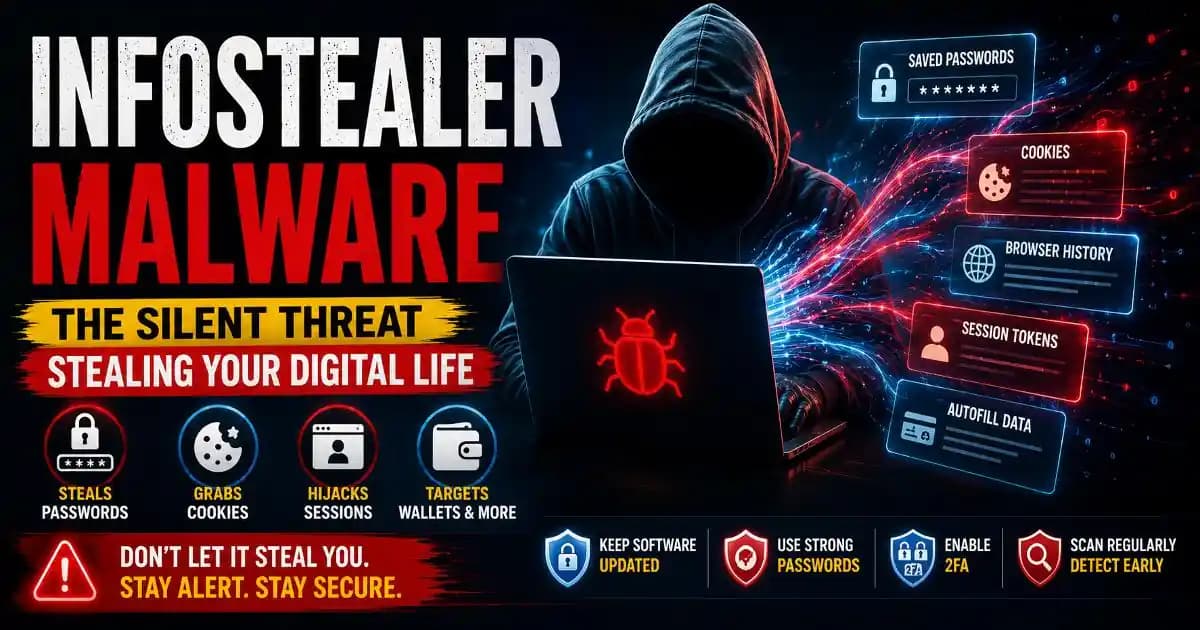
Instead of locking your files or displaying an obvious ransom Message, an infostealer may focus on the information already stored inside your browser and applications. Saved passwords, cookies, session tokens, autofill information, cryptocurrency wallet data and other credentials can become valuable targets.
That makes this type of malware particularly concerning for ordinary users. You may not notice anything unusual while your browser is open, yet information that helps identify you Online could already be leaving the device.
Microsoft describes infostealers as a significant part of the modern cybercrime ecosystem. Its research on Lumma Stealer found that the malware could steal information from browsers and cryptocurrency wallets, while Microsoft's 2025 Digital Defense Report describes stolen credentials and tokens as valuable access points for follow-on attacks. ([Microsoft][1])
What Is Infostealer Malware?
Infostealer malware is malicious software designed primarily to collect information from an infected Device and send it to an attacker.
The exact information collected depends on the malware family and its configuration. Some variants concentrate heavily on browsers, while others can target applications, cryptocurrency wallets, email clients, files, screenshots or information stored by developer tools.
Microsoft's documentation for Lumma Stealer, for example, describes the theft of stored browser credentials, cookies, browsing history and extensions, along with information associated with cryptocurrency applications and other software. ([Microsoft][2])
This is why the term “password stealer malware” can be misleadingly narrow. Passwords are important, but they are only one category of information an infostealer may pursue.
Why Browser Data Is So Valuable
Modern browsers have become much more than tools for opening websites. They can store passwords, autofill information, cookies, browsing data and other information that makes everyday online activity convenient.
That convenience creates a valuable target.
A stolen password can give an attacker direct access to an account. A stolen session token or cookie can sometimes allow an attacker to impersonate an already authenticated browser session without needing to know the original password.
This is one reason session cookie theft deserves attention. Changing a password may not be enough in every situation if an attacker has already obtained an active session. Microsoft specifically documents infostealers that collect browser session information and recommends revoking active sessions when responding to credential theft. ([Microsoft][3])
The result is a different kind of security problem: the attacker is not necessarily trying to guess your password. They may be trying to steal the evidence that your browser has already authenticated you.
How Do Infostealers Get Onto a Device?
Infostealers can arrive through several routes, and the delivery method often looks more ordinary than the malware itself.
A malicious advertisement may promote a fake browser update. A search result may lead to a counterfeit software download. A message may contain a link to a fake document or application. A pirated program may include malware inside an installer. A compromised website may also be used to redirect users toward malicious software.
Microsoft has documented Lumma distribution involving phishing, malvertising, trusted platforms and traffic-distribution systems, illustrating how modern campaigns can use several delivery methods instead of relying on a single infection route. ([Microsoft][1])
More recently, Microsoft reported infostealer campaigns targeting macOS through fake applications, malicious advertisements and ClickFix-style instructions. Some of these campaigns targeted browser credentials, cryptocurrency wallets, cloud credentials and developer secrets. ([Microsoft][4])
That evolution matters because infostealers are no longer a problem that can be dismissed as something affecting only careless Windows users.
What Can Password Stealer Malware Collect?
The information varies by malware family, but common targets can include:
- Saved browser passwords stored for websites and online services.
- Cookies and session tokens that may contain information about authenticated sessions.
- Autofill information such as names, addresses and payment-related details.
- Cryptocurrency wallet information and related application data.
- Email and messaging application data depending on the malware's capabilities.
- System information that helps attackers understand the infected device.
- Developer credentials and secrets stored in development environments or configuration files.
Microsoft's analysis of DarkGate, another information-stealing threat, documents collection of cookies, saved passwords and session tokens from browsers including Chrome, Edge, Firefox and Brave. ([Microsoft][5])
Why Stealing Cookies Can Be Worse Than Stealing One Password
Many users understand why a password matters but underestimate the importance of cookies.
When you sign into a website, the service needs a way to remember that you are authenticated as you move between pages. Session cookies and related tokens can help provide that continuity.
If an attacker obtains usable session information, they may attempt to use it to access an account without following the normal password-login process.
This is why an infostealer infection should not be treated as simply “my browser password might have leaked.” The wider question is whether active sessions, authentication information and other secrets were exposed.
Security teams may therefore respond by revoking sessions, changing credentials and rotating sensitive secrets rather than simply uninstalling the visible malware.
Signs That an Infostealer May Be Present
Infostealers are often designed to avoid attracting attention, so there is no single symptom that proves an infection.
Unexpected browser behavior, unfamiliar applications, strange extensions, unusual network activity, sudden security alerts or unexplained account logins can justify investigation. However, the absence of obvious symptoms does not prove that a device is clean.
Microsoft notes that some infections can leave remnants even after security software removes the detected malware, which is why keeping security definitions updated and running a full scan can be important after an infection. ([Microsoft][6])
The strongest warning may sometimes appear away from the infected computer: an unfamiliar login, a password reset notification, a new device appearing in an account, or suspicious activity involving an online service.
What to Do If You Think an Infostealer Infected Your Computer
- Stop using the device for sensitive logins. Avoid entering new passwords, banking information or other confidential data until the device has been investigated.
- Run a reputable security scan. Update the security software first when possible, then perform a full scan rather than relying only on a quick check.
- Use a separate trusted device. From a known-clean device, change passwords for your most important accounts, starting with your primary email and financial services.
- Revoke active sessions. Sign out other devices and review account security pages for unfamiliar sessions or devices.
- Enable stronger authentication. Use multifactor authentication where available, preferably a phishing-resistant option for important accounts.
- Review sensitive credentials. Developers should consider API keys, cloud credentials, SSH keys and other secrets that may have been stored on the compromised machine.
- Consider professional remediation. If the device handled sensitive business information or the infection appears serious, professional incident-response assistance may be safer than trying to clean everything manually.
Microsoft's RedLine guidance specifically recommends changing sensitive passwords from a separate clean device and revoking active sessions because stolen session cookies may otherwise remain useful to attackers. ([Microsoft][3])
How to Reduce the Risk of Browser Password Theft
Protection starts before an infostealer reaches the device.
Download software from legitimate sources instead of pirated or modified packages. Be cautious with advertisements offering unusually attractive software deals or “free premium” versions. Keep your operating system, browser and security software updated, and avoid executing commands copied from unfamiliar websites.
Password managers can also reduce the temptation to store passwords in insecure places or reuse the same password across multiple services. More importantly, use unique credentials for important accounts so that one stolen password does not unlock several services.
Multifactor authentication adds another layer, although users should remember that stolen sessions can create different risks. Account security therefore needs more than one defensive measure.
Why Infostealers Matter Beyond Personal Accounts
The consequences can extend far beyond a single social-media account.
An infostealer infection on a developer's computer could expose repository credentials, cloud access keys or other secrets. On a work computer, stolen browser sessions could provide access to business applications. On a personal computer, the same malware could expose email, shopping, financial or cryptocurrency accounts.
Microsoft's recent research highlights this broader problem, noting that stolen credentials can enable account takeover across banking, email, social platforms and corporate cloud services, while compromised developer credentials can expose source code and cloud infrastructure. ([Microsoft][4])
This is why infostealers are an important part of cybersecurity education rather than simply another malware name to memorize.
The Silent Threat Is the Stolen Access
Infostealer malware is dangerous because the visible infection may be only the beginning.
The real value for an attacker is the information collected after the malware runs: passwords, cookies, tokens, wallet data, application credentials and other secrets that can potentially be reused elsewhere.
That changes how users should think about malware protection. The goal is not only to prevent a suspicious program from running. It is also to protect the credentials and sessions that connect you to your digital life.
If you suspect an infection, act quickly: scan the device, secure accounts from a clean device, revoke active sessions, rotate important credentials and investigate sensitive secrets that may have been exposed.
A quiet computer is not necessarily a safe computer. With infostealers, what matters most may be happening quietly in the background and the stolen information may become valuable to criminals long after the original malware disappears.
[1]: https://www.microsoft.com/en-us/security/blog/2025/05/21/lumma-stealer-breaking-down-the-delivery-techniques-and-capabilities-of-a-prolific-infostealer/?msockid=332e87d5ab686ee029c39147aa006fd7 "Lumma Stealer: Breaking down the delivery techniques and capabilities of a prolific infostealer | Microsoft Security Blog"
[2]: https://www.microsoft.com/en-us/wdsi/threats/malware-encyclopedia-description?Name=Trojan%3AWin32%2FLummaCStealer%21MTB "Trojan:Win32/LummaCStealer!MTB threat description - Microsoft Security Intelligence"
[3]: https://www.microsoft.com/en-us/wdsi/threats/malware-encyclopedia-description?Name=Trojan%3AWin32%2FRedLineStealer.DG%21MTB&ThreatID=2147820309 "Trojan:Win32/RedLineStealer.DG!MTB threat description - Microsoft Security Intelligence"
[4]: https://www.microsoft.com/en-us/security/blog/2026/02/02/infostealers-without-borders-macos-python-stealers-and-platform-abuse/ "Infostealers without borders: macOS, Python stealers, and platform abuse | Microsoft Security Blog"
[5]: https://www.microsoft.com/en-us/wdsi/threats/malware-encyclopedia-description?Name=Trojan%3AWin32%2FDarkgate "Trojan:Win32/Darkgate threat description - Microsoft Security Intelligence"
[6]: https://www.microsoft.com/en-us/wdsi/threats/malware-encyclopedia-description?Name=Trojan%3AMSIL%2FStealer&ThreatID=2147731442 "Trojan:MSIL/Stealer threat description - Microsoft Security Intelligence"