Apple spyware threat notifications are among the most serious security warnings an iPhone user can receive, but seeing one does not automatically mean your Device has been successfully hacked. Apple says these alerts are designed for people who may have been individually targeted by highly sophisticated mercenary spyware attacks. On August 13, 2026, Apple confirmed a new wave of notifications reached targeted users in 110 countries, with the warning now appearing directly on the iPhone Lock Screen as well as in Settings and through other channels. ([TechCrunch][1])
The new delivery method is important because it makes the warning much harder to miss. It also creates a natural question: if an Apple spyware warning suddenly appears on your Lock Screen, how do you know it is genuine, and what should you do next?
What does an Apple spyware threat notification mean?
An Apple spyware threat notification means Apple has detected activity that gives it high confidence that you may have been individually targeted by a mercenary spyware attack. Apple describes these attacks as exceptionally sophisticated and says they are aimed at a very small number of specific people, often because of who they are or what they do.
Apple also makes an important distinction: its investigations can never provide absolute certainty. The notification is therefore not the same thing as a forensic report proving that spyware is currently installed on your iPhone. It is a high-confidence warning that Apple believes your device has been targeted and that you should take protective action. ([Apple Support][2])
This is very different from an ordinary antivirus-style pop-up. The alert is part of Apple's threat-intelligence and investigation process for highly targeted attacks rather than a generic warning sent to everyone who visits a suspicious website.
Why did Apple send spyware warnings to 110 countries?
On August 13, 2026, Apple confirmed that it sent a fresh batch of threat notifications to targeted users in 110 countries. Apple says it has notified users in more than 150 countries in total since it began sending these warnings in 2021. The company has not publicly identified the number of people notified in the latest wave or attributed the attacks to a specific spyware vendor, attacker, or geographic region. ([TechCrunch][1])
The geographic figure can sound alarming, but it should not be interpreted as meaning that ordinary iPhone owners across those countries are under mass attack. Mercenary spyware is generally associated with highly targeted operations in which attackers spend significant resources pursuing specific individuals. Apple says the vast majority of users will never be targeted by this type of attack. ([Apple Support][2])
Why is the Apple spyware warning appearing on the Lock Screen?
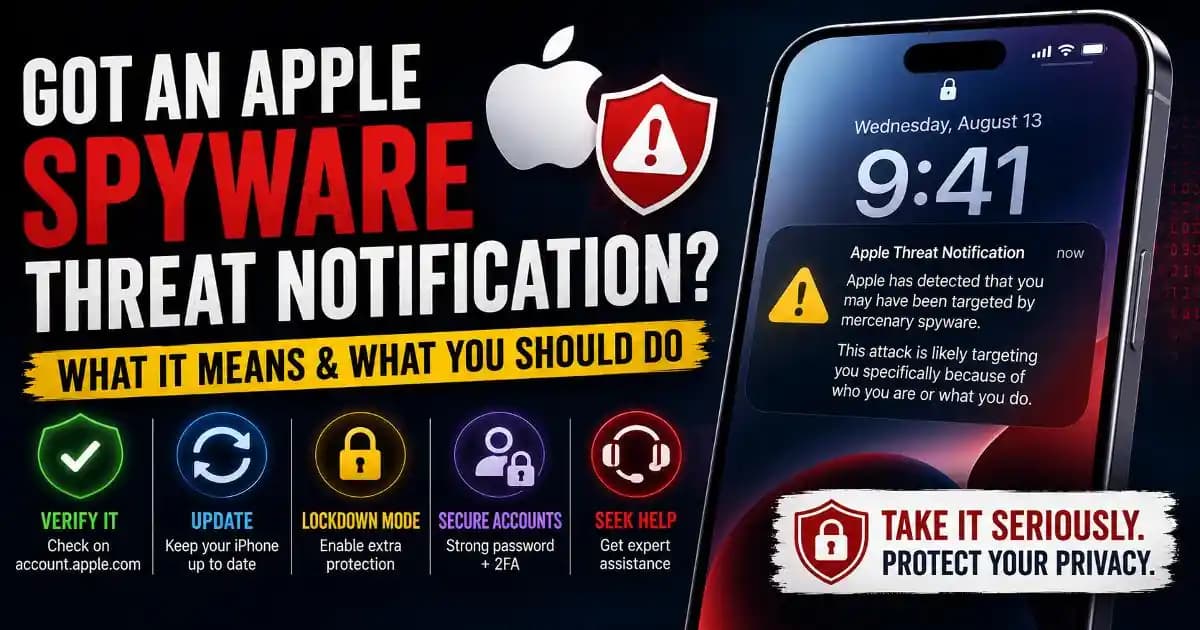
This is one of the biggest changes in the latest notification campaign. Apple says that, as of 2026, targeted users can receive the warning directly on their iPhone, including on the Lock Screen and in Settings. Apple can also send an email to addresses associated with the user's Apple Account and display a threat-notification banner after the user signs in to account.apple.com. ([Apple Support][2])
A Lock Screen warning may look unusual if you have previously seen Apple threat notifications delivered primarily through email or account Messages. That difference does not by itself mean the warning is fake. Apple has explicitly updated its notification process and says notification types can vary depending on the device model and software version. ([Apple Support][2])
How to tell if an Apple spyware notification is real
This is where caution matters because scammers can imitate security warnings. A fake Apple spyware alert could be used to steal your Apple Account password, verification code, payment information, or other personal details.
Apple says genuine threat notifications do not ask you to click a link, open an attachment, install an app or configuration profile, or provide your Apple Account password or verification code by email or phone. If you want to verify an alert, do not use a link supplied inside a suspicious message. Instead, sign in directly to account.apple.com. If Apple sent you a genuine threat notification, it will appear clearly at the top of your account page after you sign in. ([Apple Support][2])
This verification step is particularly important because the subject of the warning is serious enough that people may react quickly. A criminal can exploit that urgency by creating a fake message that looks official and then directing the victim to a fraudulent login page.
What should you do after receiving an Apple spyware alert?
If the notification is genuine, take it seriously and follow Apple's recommended security guidance. Apple specifically recommends enabling Lockdown Mode for notified users and strongly suggests seeking expert assistance. Apple points recipients toward the Digital Security Helpline operated by Access Now for emergency security assistance. ([Apple Support][2])
- Verify the warning directly through account.apple.com rather than following links in an email or message.
- Update your iPhone and other Apple devices to the latest available software.
- Enable Lockdown Mode as recommended for targeted users.
- Use a strong, unique Apple Account password and enable two-factor authentication.
- Review important accounts and devices for unusual activity.
- Seek expert help if you believe you may be a genuine target or need assistance investigating the incident.
Lockdown Mode is an optional high-security setting designed for people who may face exceptionally sophisticated cyberattacks. It restricts certain apps, websites, communications features, and other device behaviors to reduce potential attack surfaces. Apple says it should generally be used when you have a credible reason to believe you may be targeted by this type of attack. ([Apple Help][3])
Does receiving the warning mean your iPhone is already infected?
Not necessarily. This is one of the most important points to understand.
Apple describes its notifications as high-confidence alerts that a user has been individually targeted. That is different from saying Apple has confirmed that spyware successfully compromised the device. Security researchers and Apple coverage have similarly emphasized that receiving the notification does not by itself establish that the device was successfully hacked. ([TechCrunch][1])
However, that distinction should not lead you to dismiss the warning. The reason Apple sends the notification is that its internal threat intelligence indicates a serious targeting event. Treating the alert as a routine software notification would be the wrong response.
What is mercenary spyware?
Mercenary spyware refers to highly capable surveillance software developed or sold by private companies and used in targeted operations. Apple says these attacks are vastly more sophisticated than ordinary cybercrime, can require exceptional resources, and often have a short operational lifespan that makes them difficult to detect and prevent.
Public reporting has historically connected this category of spyware with attacks involving journalists, activists, politicians, diplomats, and other people considered strategically important by attackers. Apple does not attribute individual threat notifications to a specific attacker or region, and it does not publicly disclose the technical indicators that trigger each notification because doing so could help attackers evade future detection. ([Apple Support][2])
That is also why users should be cautious about claims that a particular Apple notification automatically proves the use of Pegasus or another named spyware product. Apple does not identify the specific spyware behind individual notifications. ([BleepingComputer][4])
Could the Apple spyware alert itself be a scam?
Yes. The real Apple threat-notification program creates an opportunity for criminals to imitate it.
A scammer could send an email claiming that Apple detected spyware and then provide a link to a fake Apple login page. Another version could ask you to install a security profile, download an application, call a phone number, or provide an authentication code.
Those requests conflict with Apple's guidance for genuine threat notifications. The safest habit is to separate the warning from the instructions: verify the notification independently through your Apple Account rather than trusting whatever action an email or message asks you to take. ([Apple Support][2])
This is a classic phishing pattern. The attacker does not necessarily need to create the original security problem. They only need to convince you that they are helping you solve it.
What all iPhone users can learn from the warning
Most people will never receive an Apple spyware threat notification, but the security practices Apple recommends are useful beyond mercenary spyware. Keep devices updated, protect your Apple Account with strong authentication, use a device passcode or Face ID, enable Stolen Device Protection, install apps from the App Store, and avoid links or attachments from unknown senders. ([Apple Support][2])
These habits are part of broader mobile security and account security. They will not make a device immune to sophisticated attacks, but they reduce exposure to many common threats and make account compromise harder.
The important message if you see the warning
An Apple spyware threat notification is not something to panic about, but it is something to take seriously. The latest August 2026 campaign shows that Apple is making these warnings more visible by putting them directly on targeted users' Lock Screens, while still providing verification through the Apple Account website. ([TechCrunch][1])
If you receive one, do not immediately click links or provide information to whoever contacted you. Verify the notification independently, update your devices, follow Apple's recommended protections, consider Lockdown Mode, and seek expert assistance if the warning is genuine.
The most useful distinction is simple: a real Apple spyware warning is a serious security signal, while a message asking you to “fix” that warning by handing over passwords, codes, or installing software may be the scam.
[1]: If Apple sends you a push notification alerting you to a spyware attack, take it seriously | TechCrunch
[2]: About Apple threat notifications and protecting against mercenary spyware - Apple Support (IE)
[3]:Apple Personal Safety User Guide
[4]: Apple sends new ‘Threat Notification’ alerts over mercenary spyware attacks