Session cookie theft changes the way you should think about account security because a successful login is not necessarily the end of an attack.
Most people understand the basic security sequence: enter a password, complete two-factor authentication, and get access to an account. That model is still useful, but modern phishing attacks can target what happens after authentication.
Once you successfully sign in, a website usually needs a way to remember that you are authenticated while you browse. Your browser can hold session information that represents this authenticated state. If an attacker manages to obtain that session information, they may be able to reuse it without repeating the original login process.
Google's Mandiant threat intelligence team has documented adversary-in-the-middle and browser-in-the-middle techniques that target session tokens after users complete MFA. Google also notes that stolen session cookies can allow attackers to bypass password and some MFA controls. ([Google Cloud][1])
What Is Session Cookie Theft?
A session cookie is a piece of browser-stored information that helps a website recognize an authenticated session. It is part of the mechanism that allows you to remain signed in while moving between pages.
Session cookie theft occurs when an attacker obtains usable session information and attempts to use it to impersonate the already authenticated user.
The important distinction is that the attacker may not need to discover your password at all. The password was already accepted. The MFA challenge was already completed. The attacker is instead interested in the authenticated session created afterward.
Google's Mandiant researchers explain that stealing a valid session token can be equivalent to stealing the authenticated session, meaning an attacker may no longer need to perform the original MFA challenge. ([Google Cloud][1])
Why Your Password Is Not Enough Alone
A password Protects the authentication step. MFA adds another layer to that process. But authentication and session management are connected stages rather than the exact same thing.
Think of it like entering a secure building.
Your password is one key. MFA is an additional Verification at the entrance. Once you have successfully passed those checks, the building gives you an access badge so you do not have to prove your identity every few seconds.
A session token is somewhat like that temporary access badge.
If a criminal can steal the badge, they may not need your original keys to move through the building. That is the basic idea behind session hijacking.
This does not mean MFA is useless. Quite the opposite. MFA remains one of the most important defenses against stolen passwords. The problem is that attackers have adapted by targeting other parts of the authentication process.
Google has described MFA as highly effective but not invulnerable, particularly when social engineering is used to steal credentials and session cookies. ([Google Cloud][2])
How an Adversary-in-the-Middle Attack Works
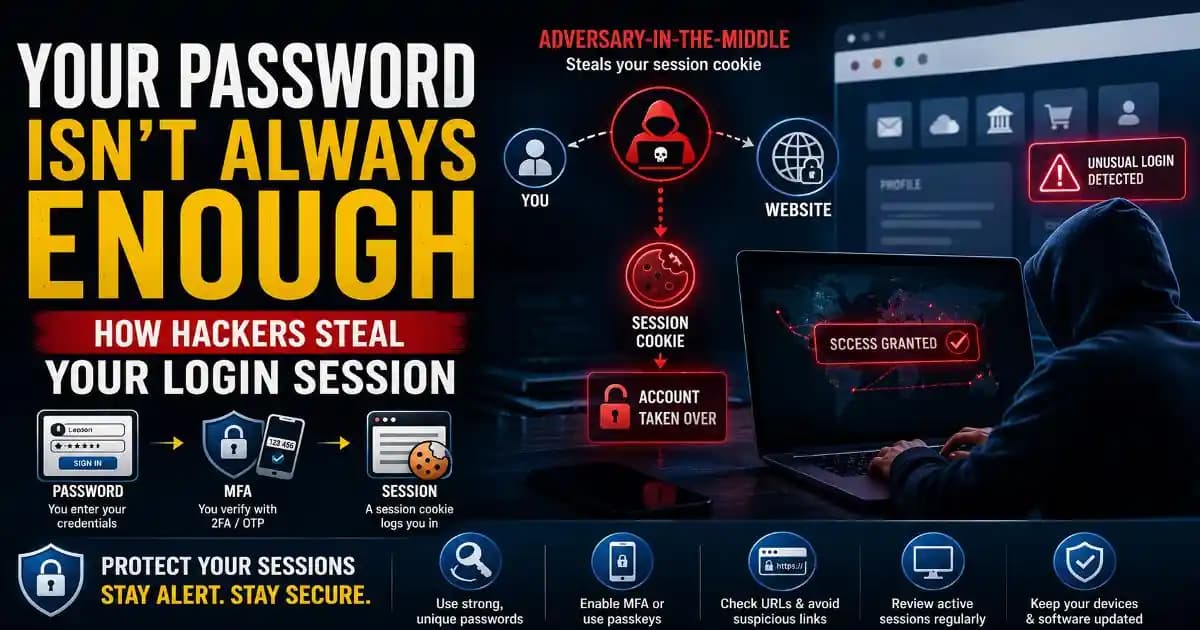
An adversary-in-the-middle, or AiTM, attack places attacker-controlled infrastructure between the victim and the legitimate online service.
The victim may receive a convincing phishing message directing them to what appears to be a familiar login page. The page can be designed to look almost identical to the real service.
The important difference is what happens behind the screen.
Instead of communicating directly with the legitimate service, the victim's browser communicates through an attacker-controlled intermediary. The intermediary can pass information between the victim and the real service while observing the authentication exchange.
In documented Mandiant testing, this type of infrastructure could capture credentials and session cookies after a victim completed MFA. The attacker could then use the captured session to access the authenticated application. ([Google Cloud][1])
From the victim's perspective, the experience can look surprisingly normal. They enter their credentials, approve the MFA request and reach the expected service. That is what makes this technique difficult to recognize.
The Password → MFA → Session Problem
The modern account security chain can be simplified like this:
Password → MFA → Authenticated session → Session token
The first two stages are familiar to most users. The last two are often invisible.
That invisibility creates a common misunderstanding: “I enabled MFA, so nobody can get into my account.”
MFA makes unauthorized access significantly harder, especially when the attacker only has your password. But if the authentication session itself is stolen, the attacker may be attempting to reuse an already authenticated state rather than starting a new login.
This is why security professionals increasingly discuss phishing-resistant authentication, device-bound credentials and stronger session protections alongside conventional MFA.
What Makes AiTM Phishing So Convincing?
Traditional phishing often depends on creating a fake login page and collecting the credentials entered into it.
AiTM attacks can go further by making the fake page function as a live intermediary. Instead of simply collecting your username and password and sending you away, the attacker-controlled system can relay your interaction with the legitimate service.
That can make the experience feel authentic. The login page may respond as expected. The MFA prompt may arrive. The destination after authentication may look familiar.
Google's documentation on browser-in-the-middle attacks describes scenarios where the victim unknowingly interacts with a browser controlled by the attacker while believing they are browsing normally. ([Google Cloud][1])
This is also why carefully checking a login page matters even when the page looks professionally designed.
How to Recognize a Possible Session-Stealing Phishing Attack
There is no single visual clue that reliably identifies every AiTM attack. However, several behaviors deserve attention.
- Unexpected login requests: Be cautious when a message suddenly tells you to verify your account, reset a password or complete an MFA update.
- Unusual login URLs: Check the actual domain rather than relying on branding, logos or page design.
- Urgent security language: Attackers often create pressure by claiming that an account will be suspended or deleted unless you act immediately.
- Unexpected MFA prompts: If you did not initiate a login, do not approve an authentication request.
- Unfamiliar account activity: New sessions, devices, locations or security changes can indicate that an account has been accessed unexpectedly.
A familiar-looking page should never be treated as proof that the connection is legitimate.
What to Do If You Suspect Your Login Session Was Stolen
If you believe you entered credentials into a suspicious login page, act quickly rather than waiting to see whether something happens.
- Change the password from a trusted device. Use a unique password that is not reused elsewhere.
- Revoke active sessions. Open the account's official security settings and sign out of unfamiliar or other active sessions where the service provides that option.
- Review recent account activity. Look for unfamiliar devices, locations, password changes, recovery changes or other security events.
- Check MFA settings. Make sure unknown authentication methods, devices or recovery options have not been added.
- Secure connected services. Review applications, OAuth connections and other integrations that may have access to the account.
- Report the phishing attempt. Reporting helps platforms and organizations investigate malicious infrastructure and protect other users.
Changing the password is important, but it should not be the only response when session theft is suspected. Google recommends revoking active sessions when dealing with stolen session cookies, because a previously authenticated session may remain usable even after credentials are changed. ([Google Cloud][1])
Why Passkeys and Security Keys Matter
One of the reasons passkeys and hardware security keys receive increasing attention is that they are designed to resist many forms of phishing.
FIDO-based authentication uses cryptographic credentials that are tied to the legitimate website or service. This makes it much harder for a fake intermediary to simply capture and replay the authentication response.
Mandiant's research notes that FIDO2-compatible security keys can provide strong protection against browser-in-the-middle attacks because the authentication response is bound to the intended origin. ([Google Cloud][1])
Google has also been developing Device-bound session protections designed to make stolen cookies less useful by cryptographically associating an authenticated session with a particular device. ([Google Cloud][3])
These technologies do not make every device or account automatically secure, but they show where account protection is heading: away from relying only on secrets that can be copied and toward credentials and sessions that are more strongly tied to legitimate devices and websites.
MFA Still Matters, Even When It Is Not Perfect
It would be a mistake to read about session cookie theft and conclude that MFA is no longer useful.
MFA still blocks many attacks that would otherwise succeed with a stolen password. The lesson is simply that authentication security is broader than the password screen.
For everyday users, a strong security setup combines unique passwords, MFA or passkeys, careful handling of login links, updated devices and regular review of account sessions.
For businesses and developers, the picture is broader still. Session lifetime, token protection, device trust, conditional access, phishing-resistant authentication and monitoring all contribute to reducing account takeover risk.
The Login Is Only the Beginning
Session cookie theft is difficult for ordinary users to understand because the most important part of the attack can happen after everything appears to have worked correctly.
You entered the password. You completed MFA. The website opened. Nothing looked obviously wrong.
But the attacker may have been interested in the authenticated session rather than the password itself.
That is why the best response is not to abandon MFA, but to think beyond it. Use phishing-resistant authentication when available, avoid login links from unexpected messages, review active sessions and respond quickly when an account shows unfamiliar activity.
Your password is still important. MFA is still important. But in a world where attackers increasingly target authenticated sessions, protecting the login session itself has become an equally important part of account security.
[1]: https://cloud.google.com/blog/topics/threat-intelligence/session-stealing-browser-in-the-middle "BitM Up! Session Stealing in Seconds Using the Browser-in-the-Middle Technique | Google Cloud Blog"
[2]: https://cloud.google.com/blog/products/identity-security/cloud-ciso-perspectives-new-threat-horizons-details-evolving-risks-and-defenses "Cloud CISO Perspectives: New Threat Horizons details evolving risks and defenses | Google Cloud Blog"
[3]: https://cloud.google.com/blog/products/identity-security/cloud-ciso-perspectives-adding-new-layered-protections-to-2fa "Cloud CISO Perspectives: Going beyond 2FA to address fast-rising, emerging threats | Google Cloud Blog"