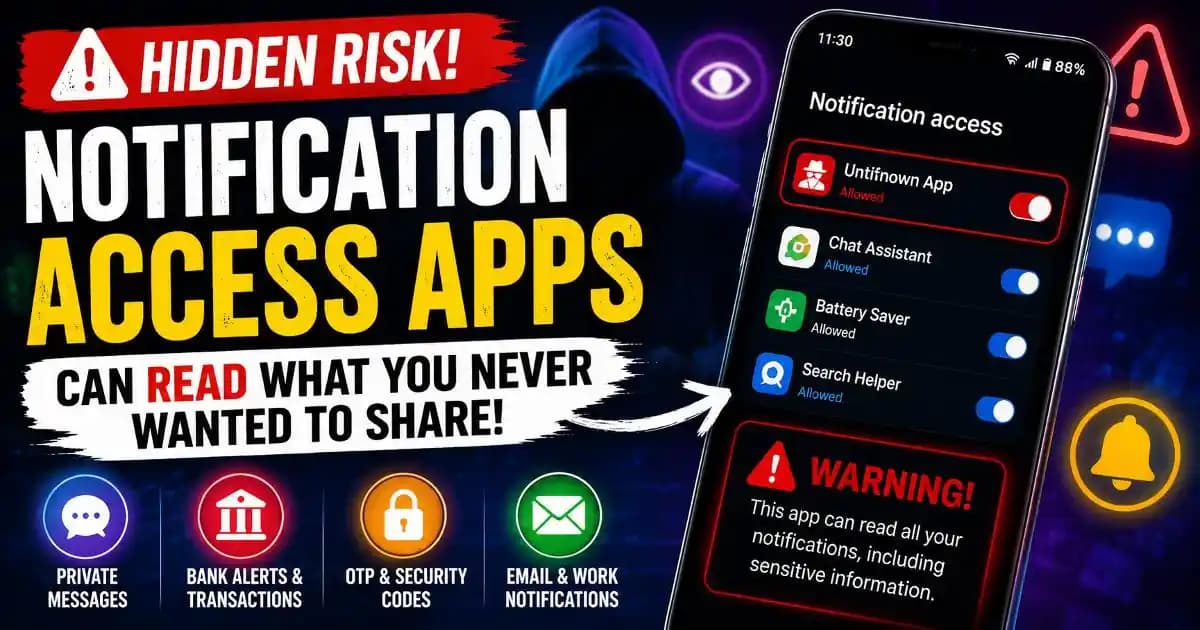
Notification access apps on Android are becoming an overlooked privacy concern as more users unknowingly grant permission for third-party software to read sensitive alerts appearing across their phones. Many people assume notifications are private because they appear temporarily on a personal device, but Android’s notification access system can expose far more information than users realize.
Modern smartphones display almost every part of digital life through notifications. Banking alerts, one-time passwords, work chats, email previews, ride Confirmations, delivery updates, calendar reminders, and private conversations all flow through the notification layer continuously.
When an app Receives notification access, it may gain visibility into much of that activity.
What makes this issue increasingly important during 2025 and 2026 is that Android users now rely on notifications more than ever before. Phones have become authentication tools, payment devices, communication hubs, and productivity systems all at once. That means notifications often contain fragments of highly sensitive information.
Many users grant notification Permissions casually because the request appears harmless or necessary for convenience features.
In reality, the Permission can create a broad observation window into personal behavior.
Why Notification Access Exists on Android
Android introduced notification Access to support legitimate functionality.
Some apps genuinely need visibility into notifications for useful features such as:
- Smartwatch synchronization
- Notification management tools
- Automation systems
- Accessibility services
- Cross-device syncing
- Digital wellbeing tools
- Productivity assistants
For example, smartwatch apps require notification visibility to mirror alerts from the phone onto wearable devices. Automation apps may trigger actions based on incoming notifications. Accessibility tools may help users interact with alerts more effectively.
The Problem is not the existence of the feature itself. The concern comes from how broadly some apps can interpret and use that access.
What Notification Access Apps Can Potentially See
Many Android users underestimate how much information Appears inside notifications.
Depending on phone settings and app behavior, notifications may contain:
- Bank transaction alerts
- Two-factor authentication codes
- Private messages
- Email previews
- Calendar schedules
- Ride-sharing activity
- Food delivery updates
- Social media conversations
- Health reminders
- Workplace collaboration alerts
Some apps can potentially read the text content itself, Identify which application generated the alert, monitor timing patterns, and observe interaction behavior.
That information may not always be stored maliciously, but it can still create detailed behavioral profiles.
Even small fragments of notification data become powerful when combined together over time.
Why Users Often Grant the Permission Without Realizing the Risk
One reason notification access spreads so easily is because Android Permission prompts often appear during moments of convenience.
A productivity app may claim:
- “Enable smart automation.”
- “Sync your alerts across devices.”
- “Improve your AI assistant experience.”
- “Activate advanced features.”
The request feels technical rather than invasive.
Unlike microphone or camera permissions, notification access does not Immediately sound personal to many users. People tend to think of notifications as temporary pop-ups rather than a live stream of sensitive information.
This perception gap creates a significant Privacy blind spot.
Modern Android ecosystems also encourage rapid permission approval because users want software to work instantly. The faster pace of app onboarding reduces the likelihood that people carefully evaluate what they are authorizing.
How Notification Data Became Valuable
Notifications are no longer simple reminders.
Over the past few years, companies redesigned notifications to increase engagement and convenience. As a result, alerts now contain more contextual information than ever Before.
A single notification may reveal:
- Where a user ordered food
- Which bank they use
- Travel schedules
- Shopping habits
- Social relationships
- Work activity
- Authentication patterns
For analytics companies, advertisers, data brokers, or malicious actors, this behavioral stream is extremely valuable.
Some Suspicious apps appear to combine notification visibility with device fingerprinting, advertising identifiers, and behavioral Tracking systems to build deeper user profiles.
Even when companies claim data is anonymized, notification patterns can still expose highly personal routines.
The Growing Connection Between Notification Access and Fraud
Security researchers increasingly observe malware and Suspicious Android apps abusing notification access instead of relying only on traditional SMS permissions.
That shift Matters because users have become more cautious about granting SMS access directly.
Notification access can sometimes provide similar visibility without triggering the same level of concern.
In some cases, malicious apps use notification permissions to:
- Read banking alerts
- Capture verification codes
- Monitor authentication activity
- Hide security warnings
- Dismiss alerts automatically
- Observe cryptocurrency transactions
Some Android malware families even exploit notification access to intercept one-time passwords used for two-factor authentication.
The broader trend reflects how Mobile fraud evolved during 2025 and 2026. Attackers increasingly target convenience systems and user attention layers rather than relying only on traditional hacking methods.
Why AI-Powered Apps Increase the Privacy Concern
AI-enhanced Android apps are expanding the notification access issue further.
Many AI assistants now request notification permissions to:
- Generate smart replies
- Summarize messages
- Organize reminders
- Prioritize alerts
- Automate workflows
Some of these features are genuinely useful. But they also require broader visibility into personal communication streams.
The more AI systems process notifications, the more sensitive contextual information becomes available inside app ecosystems users may not fully understand.
Users often focus on the intelligence or productivity benefits while overlooking the scale of behavioral data involved.
This creates a new type of privacy challenge where convenience, automation, and surveillance increasingly overlap.
How Android Tries to Manage Notification Privacy
Google continues improving Android security controls Through permission dashboards, notification management settings, and clearer visibility around app access.
Modern Android versions allow users to:
- Review notification access permissions
- Disable specific app visibility
- Limit lock-screen previews
- Restrict sensitive content display
- Monitor app behavior more closely
But despite these improvements, many users rarely revisit permission settings after initial app Installation.
Some apps also encourage permanent access because certain features stop functioning without it.
This creates a subtle tradeoff between convenience and privacy.
The Problem With “Helpful” App Ecosystems
One major shift in modern mobile software is that apps increasingly want to act proactively rather than passively.
Apps no longer wait for users to open them. They anticipate behavior, automate actions, summarize information, recommend responses, and integrate across multiple services.
To accomplish this, developers seek broader device visibility.
Notification access becomes especially attractive because notifications reveal real-time behavior across many unrelated apps at once.
This creates a surveillance layer hidden beneath normal smartphone convenience.
For example, an app may not need direct access to banking software if it can still observe transaction alerts appearing through notifications.
Similarly, it may not require direct email access if Message previews already appear inside notifications.
Why Remote Work and Multi-Device Life Increased the Risk
Remote work culture accelerated notification dependence.
People now manage work chats, cloud collaboration tools, authentication systems, personal messaging apps, and financial alerts simultaneously from the same device.
Notifications became the operating system of modern digital life.
That concentration of information means a single permission can expose both professional and personal activity streams together.
Cross-device ecosystems also complicate visibility. Smartwatches, tablets, desktop syncing tools, and AI assistants increasingly process notifications across multiple environments.
The result is a larger and more fragmented privacy surface than most users realize.
What Android Users Should Review Right Now
Users do not need to panic or disable every notification-based feature. Many apps use notification access responsibly.
But Android users should periodically review which applications currently hold this permission.
Important questions include:
- Does the app genuinely need notification visibility?
- Do the features justify the level of access?
- Is the developer trustworthy?
- Could the same function work without full notification access?
- Has the app requested additional unusual permissions?
Users should be especially cautious with:
- Unknown AI assistants
- Third-party automation tools
- Suspicious productivity apps
- Modified APK installations
- Apps downloaded outside official marketplaces
Small convenience features are often not worth broad visibility into personal communications.
The Bigger Shift Happening Across Mobile Privacy
The notification access issue reflects a larger transformation happening across digital ecosystems.
Modern apps increasingly compete to become centralized assistants managing communication, productivity, payments, scheduling, and daily behavior. To deliver these experiences, they seek continuous contextual awareness.
Notifications provide exactly that.
Unlike isolated permissions such as camera or location access, notifications create a flowing behavioral timeline that reveals how users interact with the digital world in real time.
As AI-driven personalization expands across Android ecosystems, notification data may become even more valuable because it reflects emotion, urgency, routine, and decision-making patterns simultaneously.
The future of mobile privacy will likely depend less on avoiding technology entirely and more on understanding how small permissions quietly connect together into larger behavioral systems.
For many Android users, notification access may already expose far more of daily life than they ever intended to share.