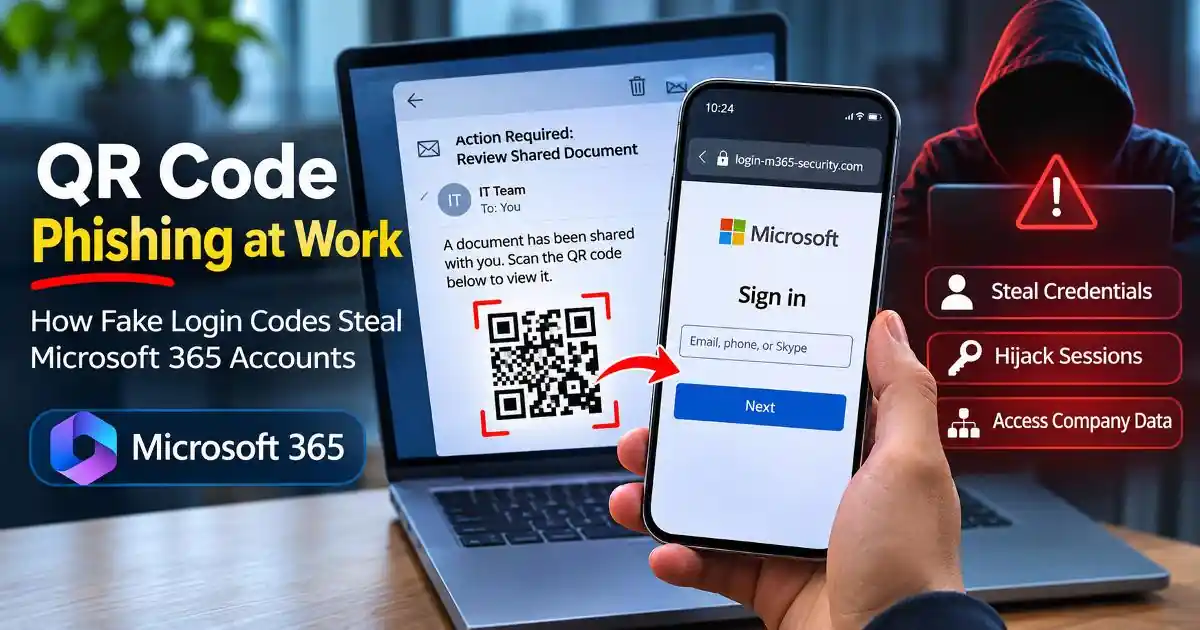
QR code phishing can turn an ordinary workplace email into a serious Microsoft 365 account security risk. An employee receives what looks like a routine document-sharing notification, scans a QR code using a smartphone, and arrives at a login page that appears to belong to Microsoft. The page requests familiar credentials, and the employee may complete authentication without realizing that the process is being manipulated.
This technique, commonly called quishing, uses QR codes as a delivery method for phishing attacks. Instead of presenting an obvious suspicious hyperlink, attackers hide a web address inside an image. This approach is particularly relevant to workplaces where employees regularly scan codes from PDF documents, meeting invitations, account notifications and printed instructions.
Google's June 2026 fraud and scams advisory specifically identifies QR-code phishing and adversary-in-the-middle attacks as evolving threats. It explains that attackers can capture passwords and session cookies through convincing authentication flows, potentially bypassing conventional multi-factor authentication protections. Google's security advisory provides additional context about these techniques.
Why QR Code Phishing Targets Microsoft 365 Accounts
Microsoft 365 accounts often provide access to much more than email. Depending on an employee's permissions, a compromised account may expose Outlook messages, OneDrive files, SharePoint documents, Microsoft Teams conversations and other organizational resources.
For attackers, obtaining access to one employee account can create opportunities for further attacks. They might search email conversations for financial information, inspect shared documents, impersonate employees or send fraudulent messages to suppliers and colleagues.
QR codes offer an alternative way to deliver phishing destinations. A malicious code can be embedded inside a PDF attachment or an image within an email. The employee may read the message on a computer but scan the code using a personal smartphone. This moves the interaction away from the original email environment and can make it harder for some workplace security controls to inspect the destination.
Attackers may also exploit familiar business situations. Examples include document approval requests, HR notifications, shared-file invitations, account reauthentication messages and meeting access instructions. The QR code is presented as a convenient shortcut rather than an obvious security risk.
How a Fake Microsoft 365 QR Login Works
A typical QR code phishing attempt begins with a message that appears relevant to the employee's responsibilities. It might claim that an important document is waiting for approval or that access to a shared file needs to be restored.
The message contains a QR code that supposedly opens the document or completes verification. After scanning it, the employee is redirected to a website designed to imitate a Microsoft sign-in page.
In a basic credential-harvesting attack, the fake page records the username and password entered by the victim. The attacker can then attempt to use those credentials against the real service.
More sophisticated campaigns use adversary-in-the-middle, or AiTM, infrastructure. Instead of simply displaying a fake form, an attacker-controlled intermediary relays authentication interactions between the victim and the legitimate service. This can allow the attacker to capture credentials and authentication-related session information during the login process.
Once a valid session token or cookie is obtained, an attacker may attempt to reuse the authenticated session. This is why some phishing attacks can succeed even when an employee completes an MFA challenge. The attacker is targeting the authenticated session rather than necessarily breaking the MFA mechanism itself.
MITRE ATT&CK documents this technique under Steal Web Session Cookie (T1539). Its technical explanation describes how stolen session cookies can enable access to web applications without repeating the original authentication process.
Device-Code Phishing Is Another Workplace Risk
Not every QR-based Microsoft 365 attack uses a conventional fake password form. Some campaigns combine QR codes with device-code phishing, which abuses legitimate device authorization workflows.
In this scenario, an employee may be directed to a genuine Microsoft verification page and instructed to enter a code displayed elsewhere. The employee believes the code is necessary to verify a device or restore account access. However, the authorization request may have been initiated by an attacker attempting to connect their own device or application to the employee's account.
This distinction matters because the employee may be interacting with a legitimate Microsoft website. The danger comes from authorizing a request that they did not initiate or understand.
India's CERT-In addressed this threat in its August 7, 2026 advisory, CIAD-2026-0037, concerning emerging threats targeting Microsoft 365. The advisory describes campaigns involving compromised supplier accounts, malicious PDF attachments, embedded QR codes and fraudulent device-code authentication workflows. It also discusses session-token compromise and unauthorized persistent access.
Read the CERT-In Microsoft 365 security advisory for the technical details and organizational recommendations.
Warning Signs Employees Should Recognize
A QR code is not automatically dangerous, and scanning one does not automatically compromise a device. The important question is where it sends the user and what the resulting website asks them to do.
- Unexpected authentication requests: Be cautious when a document or email suddenly asks you to scan a code to restore Microsoft 365 access.
- Unusual document notifications: A message claiming that HR, management or a supplier has shared an urgent document should be independently verified when unexpected.
- Unfamiliar website addresses: Check the actual domain before entering credentials. Microsoft branding and familiar page layouts do not prove that a website is legitimate.
- Unexpected device verification: Never enter a device authorization code simply because a QR-linked page instructs you to do so.
- Unexpected MFA prompts: Do not approve authentication requests that you did not initiate.
- Unusual urgency: Messages threatening account suspension, document deletion or immediate access restrictions deserve additional scrutiny.
Employees should verify unexpected document-sharing and authentication requests through an established company communication channel rather than relying on contact information supplied in the suspicious message.
How Employees Can Protect Microsoft 365 Accounts
Prevention starts with changing how employees approach authentication requests. A QR code should be treated like an ordinary link: its appearance does not establish whether its destination is trustworthy.
When a workplace email contains a QR code, employees should avoid scanning it if the request is unexpected. Instead, they can open the organization's approved Microsoft 365 portal directly using a trusted bookmark or known address. If a document really has been shared, it should normally be accessible through the organization's established sharing workflow.
Employees should also avoid entering credentials into websites reached through unexpected QR codes. They should never approve unfamiliar device authorization requests or provide authentication codes to someone claiming to be from IT support.
Using phishing-resistant authentication is another important protective measure. Passkeys and FIDO2 security keys use cryptographic authentication tied to the legitimate website or service. This helps protect against many credential-harvesting and adversary-in-the-middle phishing techniques.
However, organizations should not assume that enabling any form of MFA makes every authentication workflow immune to social engineering. Authentication methods, session management and device security all need to work together.
What IT Administrators Should Do
Organizations should treat QR-code phishing as an identity-security issue rather than simply an email-filtering problem. Traditional URL inspection may not be sufficient when a malicious destination is embedded in an image or when the employee scans it using a separate device.
IT teams can improve protection by deploying email security controls that inspect attachments and image-based threats where supported. They should also provide a clear process for employees to report suspicious QR codes, unexpected sign-in requests and unusual authentication activity.
Microsoft Entra administrators should review sign-in logs, investigate unfamiliar authentication patterns and monitor risky account activity. Conditional Access policies, device compliance requirements and phishing-resistant authentication can help reduce exposure.
Microsoft's identity and access security guidance discusses phishing-resistant authentication and token protection. Organizations should evaluate available controls according to their licensing, platform support and operational requirements.
Following a suspected compromise, administrators should investigate the account rather than assuming that a password reset alone resolves the incident. Depending on the attack, response actions may include resetting credentials, revoking active sessions and tokens, reviewing authentication methods, removing unauthorized application access and checking for suspicious mailbox forwarding rules or other persistence mechanisms.
Employees should report incidents promptly, especially if they entered credentials, approved an unexpected authorization request or accessed a suspicious QR-linked login page.
What If You Already Scanned a Suspicious QR Code?
Scanning a QR code alone does not necessarily mean your Microsoft 365 account has been compromised. The response depends on what happened after the scan.
If the code opened a website but you did not enter information or approve anything, close the page and report the message to your organization's IT team. If you entered your credentials, contact IT immediately and change your password through a trusted route. Ask the administrator to revoke active sessions and investigate recent sign-in activity.
If you entered a device authorization code or approved an unfamiliar sign-in, treat the situation as a potential account compromise even if the page displayed a successful verification message. The IT team should investigate application authorizations, session tokens, connected devices and suspicious account changes.
For business accounts, early reporting is especially important because an attacker may use compromised email access to target colleagues, customers and suppliers. Organizations should follow their incident-response procedures and preserve relevant email and sign-in evidence.
Why QR Code Security Needs More Than MFA
Multi-factor authentication remains an important layer of account protection, but modern phishing attacks demonstrate why identity security cannot depend on one control alone.
A QR code can deliver an employee to a fraudulent website. A convincing authentication flow can manipulate the employee into sharing credentials or authorizing an attacker's session. In more advanced cases, stolen session information may allow an attacker to continue accessing resources after the original login has succeeded.
For Microsoft 365 users, the practical lesson is straightforward: verify unexpected login requests, use phishing-resistant authentication where available, and never authorize device or application access that you did not initiate. Organizations should combine employee awareness with strong identity controls and active monitoring.
QR codes make accessing workplace resources convenient, but convenience should never replace verification. Understanding how quishing and device-code phishing work can help employees recognize suspicious requests before a single scan becomes an account-security incident.
Official Sources and Further Reading
- Google: Our Latest Frauds and Scams Advisory (June 8, 2026) QR phishing, AiTM attacks and session-cookie risks.
- CERT-In: Advisory on Emerging Threats Targeting Microsoft 365 (August 7, 2026) Device-code phishing, QR-based delivery and session-token compromise.
- MITRE ATT&CK: Steal Web Session Cookie (T1539) Technical explanation of session-cookie theft.
- Microsoft Learn: Protect Identities and Secrets Phishing-resistant authentication and token protection.
- Microsoft Learn: Token Theft Playbook Investigation and response guidance for token theft.
Frequently Asked Questions
Can scanning a QR code steal my Microsoft 365 password?
Scanning alone does not normally reveal your password. However, a malicious QR code can open a fake login page designed to capture credentials when you enter them.
Can QR code phishing bypass Microsoft 365 MFA?
Some advanced adversary-in-the-middle attacks can capture authenticated session information after MFA is completed. Device-code phishing can also trick users into authorizing an attacker's access.
How can I identify a fake Microsoft login QR code?
Check why the code was sent, inspect the destination domain and verify the request through your organization's official IT channel. Never trust a page simply because it displays Microsoft branding.
What should I do if I entered my Microsoft 365 password on a suspicious page?
Contact your IT team immediately, change your password through a trusted route, and request an investigation of active sessions, authentication methods and connected applications.
Is MFA enough to protect a workplace Microsoft 365 account?
MFA provides important protection, but phishing-resistant methods such as passkeys and FIDO2 security keys offer stronger resistance to many phishing attacks. Organizations should also monitor sessions and enforce appropriate identity controls.