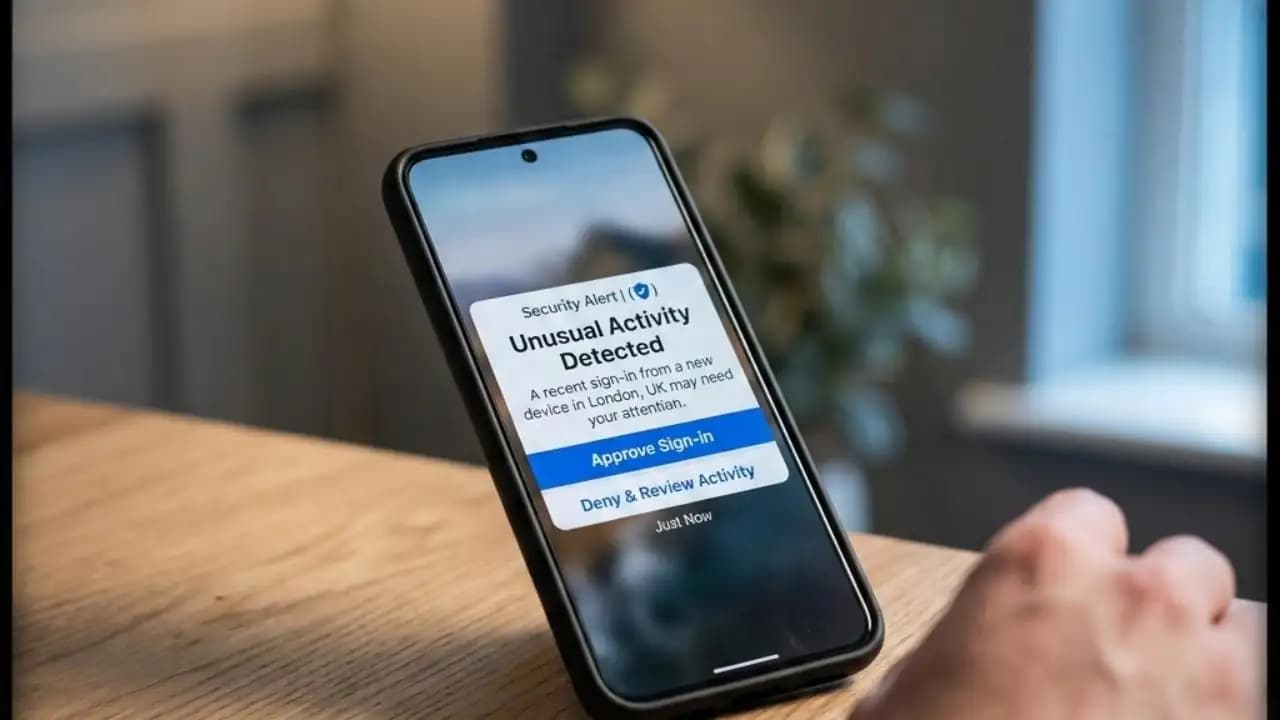
A suspicious login alert on your phone can feel like a small panic button has been pressed inside your pocket. You're scrolling through your day, and suddenly a notification appears: "We detected a new login to your account from an unknown device." Your stomach drops. Did someone just hack you? Should you change your password right now? Or is this one of those false alarms that phones send out constantly?
The truth is more nuanced than most people realize. These alerts exist for good reason they're designed to protect you. But in 2024 and 2025, the way Scammers abuse these notifications has become increasingly sophisticated, which means knowing how to respond matters more than ever.
Let me walk you through what's actually happening when you see one of these alerts, why they're becoming more common, and how to tell the difference between a genuine Security Warning and a sophisticated trick designed to steal your credentials.
The Scenario: When Your Phone Becomes a Question Mark
Here's how it typically unfolds. You're at work, at home, or waiting in line somewhere. Your phone buzzes. You unlock it and see a notification from Google, Apple, Microsoft, Meta, or your bank. The Message is clear and usually formal:
"New login detected: Chrome on Windows 10 from United States"
Or maybe:
"Someone just signed into your WhatsApp from a new device."
Or even more alarming:
"Unusual activity detected on your account. Verify your identity now."
Most of the time, your immediate reaction is honest confusion. You didn't sign in from a new Device. You didn't give anyone your password. So what's going on?
Sometimes, the answer is straightforward: maybe you're using a new phone, logging in from a different location, or Accessing a service you haven't used in months. Legitimate login alerts are actually your accounts' way of saying, "We noticed something different, and we want to make sure it's really you."
But increasingly, users are experiencing a different version of this scenario. The alert is fake. It's designed to scare you into Clicking a link or revealing information that will actually compromise your Security.
Why These Alerts Are Suddenly Everywhere
The volume of login alerts users are reporting has noticeably increased since late 2023, and Through 2024 and into 2025, the sophistication of fake alerts has evolved considerably.
There are a few reasons for this shift:
Attackers have realized login alerts are effective psychological triggers. When you see an official-looking notification claiming someone is accessing your account, your first instinct isn't to think criticallyit's to act. Panic bypasses skepticism. That's exactly what scammers want.
Phishing and social engineering have become more refined. Attackers now study how legitimate platforms word their security notifications. They replicate the language, formatting, and urgency almost perfectly. A fake alert from "Google Security" or "Apple Support" can look indistinguishable from the real thing, especially on a small phone screen.
Two-factor authentication is now standard, so attackers need a new angle. If most accounts are protected by 2FA (two-factor authentication), scammers can't easily break in by simply guessing passwords. Instead, they try to trick you into voluntarily giving them access. A fake login alert is the perfect bait.
Account takeovers are increasingly valuable. Your email, social media, and banking accounts are gateways to everything elserecovery codes, payment methods, identity verification. Taking over one account often means gaining access to many others. This is why attackers are investing in more convincing deception.
The Warning Signs: Real Alerts vs. Sophisticated Fakes
Learning to spot the difference between a genuine alert and a fake one is your strongest defense.
Real login alerts from legitimate companies typically:
- Come directly through the platform itself (inside the app or via a verified notification channel)
- Don't ask you to click an external link to "verify" or "confirm"
- Use your actual account information (like showing the device name or location)
- Don't ask for your full password
- Don't demand immediate action with extreme urgency
- Have clear language from companies you recognize
Fake alerts or suspicious variations often:
- Come as text messages (SMS) pretending to be from your bank or email provider
- Include a link that takes you to a lookalike website (like "goog1e.com" or "app1e.com" instead of the real domain)
- Use generic greetings ("Dear User" instead of your name)
- Ask you to "verify your identity" or "confirm your account" by entering sensitive information
- Create false urgency: "Your account will be locked in 15 minutes"
- Come from email addresses or phone numbers that look slightly off
- Request your full password, security questions, or credit card information
- Include spelling or grammar errors (though modern scams have gotten better at this)
Here's a concrete example from reports in early 2025: Users Receive a text Message claiming to be from their bank, saying "Suspicious Login detected. Verify now: [shortened URL]." The link takes them to a website that looks nearly identical to their actual bank's portal. They enter their login credentials to "verify," and the scammer now has Access to their real Account.
The scariest part? By the time the user realizes it's fake, the attacker has already used their credentials to change the password, add a recovery email, and potentially drain Accounts or steal identity information.
Why These Alerts Are Dangerous (Even When They're Real)
This is the paradox that makes login alerts so tricky: even genuine Security alerts can be Dangerous if you don't handle them correctly.
If you panic and click on a link in what you think is a legitimate alert, you might end up on a phishing site. If you ignore a real alert, someone could actually be accessing your account. If you immediately change your password without checking which device triggered the alert, you might lock yourself out or accidentally enable the attacker's access.
The danger multiplies when you consider what hackers can do with account access:
- Email accounts are master keys. Once someone controls your email, they can reset passwords on every other account, access recovery codes, and impersonate you to your contacts.
- Banking and payment apps offer direct access to your money.
- Social media accounts can be used to scam your friends, spread malware, or damage your reputation.
- Two-factor authentication codes can sometimes be intercepted if an attacker has your phone number or email.
And here's what many people don't realize: once a scammer has your credentials, they often don't use them Immediately. They might sit on the access, watching your account, waiting for the right moment to strikeor selling the credentials to someone else.
How Scammers Have Evolved Their Tactics (2024–2025)
The past year and a half have shown distinct shifts in how attackers deploy fake login alerts:
Targeted alerts are becoming more common. Instead of sending generic alerts to millions of people, scammers are now researching their targets. They might know which banks you use, which email provider you have, or which apps you're active on. The fake alert they send you will be specifically designed for your circumstances.
Multi-channel attacks are standard now. A scammer might send you a fake login alert via SMS, then follow up with a convincing email, then a phone call claiming to be from "account security." The repetition makes it feel legitimate.
QR codes and shortened URLs hide the real destination. Instead of sending you directly to a phishing website, scammers now use QR codes or link shorteners. You scan the code or click the link, and you have no way to verify where it actually leads until it's too late.
AI-generated voices and messages. Scammers are using AI to create phone calls and messages that sound even more authentic. A call claiming to be from your bank's security team might actually be a recording.
What You Should Actually Do
If you receive a suspicious login alert, here's the calm, methodical approach:
Step 1: Don't click any links in the alert itself.
If it's a text message or email claiming to be from your bank, Google, or Appledon't click the link. This is non-negotiable.
Step 2: Go directly to the legitimate website or app.
Open your browser and manually type the website address (or open the official app from your phone's app store). Don't use any links from the alert. This way, you ensure you're on the real platform.
Step 3: Log in and check your account activity.
Once you're on the legitimate website or app, look for account security or login history. Most platforms show you recent login attempts, Devices, and Locations. If you see an unfamiliar device or location, that's a real sign of concern.
Step 4: If something looks wrong, change your password immediately.
Use a strong, unique password. Don't reuse passwords from other accounts.
Step 5: Enable or strengthen two-factor authentication.
If you don't have 2FA enabled, turn it on. If you do, consider upgrading to a more secure method (like a security key instead of SMS codes).
Step 6: Check your recovery options.
Make sure your backup email address and phone number are still yours. Scammers sometimes change these to lock you out of your own account.
Step 7: Monitor your account for the next few weeks.
Check login Activity regularly. Set up alerts (if the platform offers them) to notify you of new logins.
Why You Shouldn't Panic (But You Should Stay Alert)
The good news: companies send these alerts because they care about your security. The system is working as designed. The fact that you got an alert is evidence that something triggered the platform's security team. Usually, it's nothing.
The realistic perspective: Yes, scammers are getting smarter. Yes, fake alerts exist. But you're not helpless. The steps above take just a few minutes, and they close the gap between a genuine alert and a successful scam.
The key is to pause before you react. That moment of hesitationwhere you don't click the link, where you do verify the address in your browser, where you don't rushis where your real protection lies.
The Bottom Line
A suspicious login alert on your phone is like a knock on your door. It could be someone you trust, or it could be a stranger. Either way, you don't open the door without checking who's on the other side first.
Don't click links in unsolicited alerts. Don't give out information over the phone unless you initiated the call. Don't assume an alert is real just because it looks official. And don't assume it's fake just because it inconveniences you.
Instead, take a breath, go directly to the source, and verify on your own terms. That's not paranoia. That's informed caution. And in 2025, it's the difference between a minor inconvenience and a major problem.
FAQ SECTION
Q: If I see a login alert but I didn't actually try to log in, does that mean my account was hacked?
A: Not necessarily. Many legitimate alerts are false positives. Your IP address might have changed (switching from home WiFi to Mobile data), you might be in a new location, or the platform might be extra cautious. Check your login history on the actual platform. If you see a Device or location you don't recognize and you're concerned, change your password and enable 2FA. But a single alert alone doesn't mean a breach has occurred.
Q: Should I change my password every time I see a login alert?
A: Only if you verify (by going directly to the platform) that the login alert is legitimate and the device or location is unfamiliar. Changing your password unnecessarily won't hurt, but it's not always needed. What should be automatic: enabling two-factor authentication if you haven't already, and regularly checking your account's login history and recovery settings.
Q: What's the difference between a real login alert and a phishing attempt?
A: Real alerts come through the app or official channels and don't ask you to click external links to verify. They might direct you to check your account security, but they don't ask for passwords or sensitive information. Phishing alerts arrive unsolicited (via email or SMS), include links to unfamiliar domains, use urgent language, and request Personal information. When in doubt, go directly to the platform yourself instead of clicking any link in the alert.
Q: Can I really trust alerts from my bank?
A: Only if you verify them by going directly to your bank's app or website. Banks do send legitimate security alerts, but scammers also impersonate banks extremely convincingly. The safest approach: never click a link in a banking alert. Instead, open your bank's official app and check your account directly. If there's truly an issue, you'll see it in your account activity.
Q: What should I do if I already clicked a suspicious link and entered my password?
A: Change your password immediately from a different device or browser. Enable or strengthen two-factor authentication. Check your account's recovery settings and login history. Contact your bank or email provider's actual support line (use a number from their official website, not from the suspicious alert) if you used banking credentials. Monitor your account closely for the next few weeks. If you notice unauthorized transactions or suspicious activity, report it to your financial institution right away.