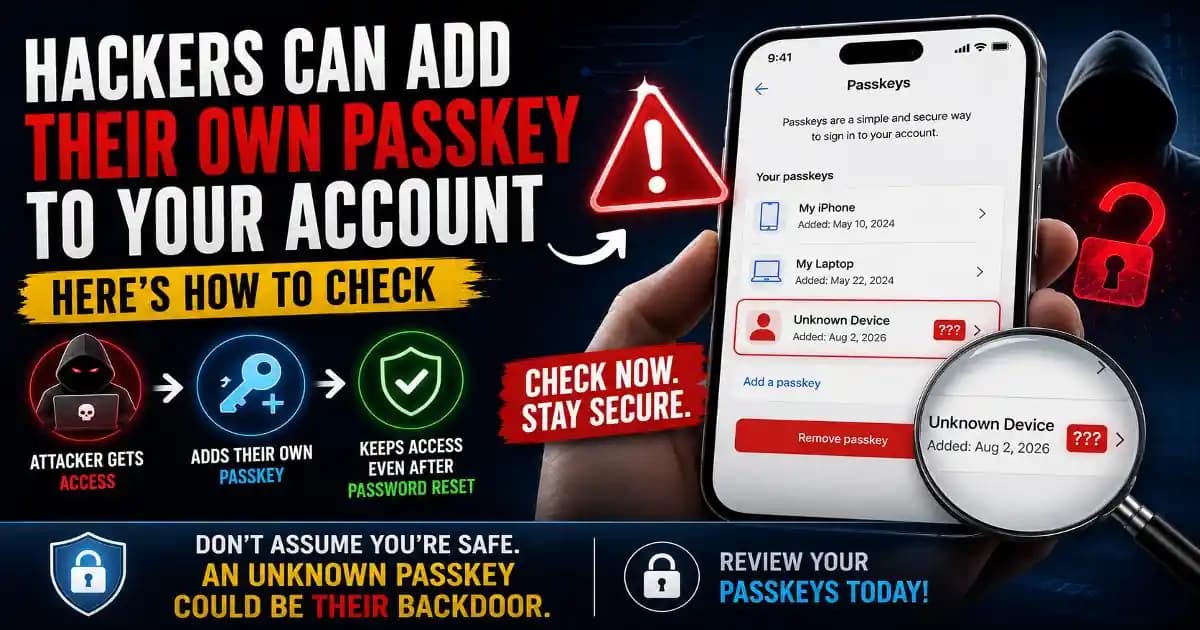
An unauthorized passkey can become a serious account-security problem if an attacker briefly gains access and uses that window to register their own authentication method. The concern is not that passkeys are inherently weak. In fact, passkeys are designed to resist phishing. The problem is what can happen after an attacker has already crossed the account's security boundary.
Recent security research has highlighted this newer attack angle. Researchers have demonstrated scenarios in which adversaries can create or abuse passkeys after gaining access to an account, potentially giving them a way to return later even after the victim changes a password. Separate research presented at USENIX Security 2026 also found that users can struggle to identify and remove adversarial passkeys after an account compromise. ([USENIX][1])
That makes an unfamiliar passkey worth investigating immediately. If you ever see a passkey, security key, Device, or authentication method that you do not recognize, changing your password should not be the only step.
What is an unauthorized passkey?
An unauthorized passkey is a passkey registered to your account without your permission. A legitimate passkey is normally created by you on a device or security key that you control. It lets you authenticate using the device's biometric unlock, PIN, or another supported local Verification method instead of typing a password.
The problem begins when someone else gets enough access to your account to add their own passkey. That passkey can then become another way to authenticate to the account.
Google itself warns users to create passkeys only on devices they personally own and regularly use. Its documentation explains that anyone who can unlock a device where a passkey was created may be able to access the associated Google Account. ([Google Help][2])
How can a hacker add their own passkey?
The attack does not require breaking the cryptography behind passkeys. Instead, the attacker first needs some form of account access or control over the authentication process.
One possible path begins with phishing. A victim enters credentials into a convincing fake login page, or an attacker obtains access through malware, stolen session information, or another compromised authentication mechanism. While that access window is active, the attacker may attempt to register a new passkey under their control.
Once successfully registered, the attacker-controlled passkey can provide another authentication route. That is why a password reset alone may not remove every form of persistence.
Recent reporting on the iAuthFlow v2 malware described a related technique in which attackers exploit a brief period of authenticated access to generate their own passkeys. The reported attack targeted services including Google, Microsoft, iCloud, and LinkedIn. ([TechRadar][3])
Why changing your password may not be enough
Password resets are still an important response to account compromise, but modern accounts can have several authentication mechanisms operating at the same time.
Think of your password as one key to a building. If an intruder secretly creates another key while they are inside, changing the first key does not necessarily invalidate the second one.
A passkey, security key, recovery method, active session, OAuth connection, application token, or other trusted authentication mechanism can potentially matter during account recovery. The exact behavior depends on the service, but the broader security principle is consistent: after a suspected compromise, review the account's complete authentication and access landscape.
Google recommends Security Checkup for reviewing account security, recovery options, passkeys, two-step verification, and connected applications. ([Google Help][4])
How to check for an unauthorized passkey
The first step is to open your account's security settings directly rather than following a link from an unexpected email or message. Look for the section that manages passkeys, security keys, sign-in methods, or authentication devices.
On a Google Account, Google says passkeys and security keys can be managed from the account's security settings, while saved passkeys can also be viewed through Google Password Manager. ([Google Help][5])
Look carefully at the list. Ask yourself whether you recognize every passkey, device, security key, and recent authentication event. An unfamiliar device name, unexpected creation date, or authentication method you never configured deserves attention.
Do not assume an unfamiliar name is automatically malicious. Device names can be confusing, and passkeys can synchronize across supported ecosystems. The important question is whether you can confidently associate the credential with a device or account action you authorized.
What should you do if you find a suspicious passkey?
If you identify an unauthorized passkey, remove it using the account provider's official security controls. Do not rely on simply changing the password.
- Remove the unknown passkey or security key.
- Change the account password from a trusted device if the password may have been exposed.
- Review active sessions and sign out unfamiliar devices.
- Check recovery email addresses, phone numbers, and other authentication methods.
- Review connected applications and revoke access you do not recognize.
- Check recent security activity for suspicious sign-ins or account changes.
- Enable strong multi-factor authentication and update recovery information if necessary.
Google's guidance specifically explains that a lost or stolen passkey can be removed from the account while the user still has access. ([Google Help][6])
What if the attacker added the passkey before you noticed?
This is where account recovery becomes more complicated. An attacker who has already added an authentication method may attempt to return after the victim believes the account is secure.
Research presented at USENIX Security 2026 found that people investigating passkey-related account compromise often struggled to identify and fully remove adversarial passkeys. The researchers studied Google, PayPal, and LinkedIn and found that account-security interfaces and recovery processes did not always make the required cleanup obvious. ([USENIX][1])
That finding matters because the problem is partly human. A user may change the password, receive a reassuring security message, and assume the incident is over without checking every authentication method.
If you suspect a serious compromise, work through the provider's official account-recovery process and review every available security control. For business accounts, involve your IT or security team because administrator logs and identity-provider controls may reveal activity that an ordinary user cannot see.
Passkeys are still a strong security improvement
It is important not to interpret these attacks as proof that passkeys are worse than passwords. Passkeys remain highly resistant to many forms of phishing because the authentication process is cryptographically bound to the legitimate website and the user's device or credential.
Google recommends passkeys as part of stronger account protection and says they cannot simply be shared, copied, or accidentally typed into a phishing website in the way a password can. ([Google Help][4])
The newer threat is different. Instead of tricking someone into revealing a passkey's secret, an attacker who already has account access may try to register another credential or abuse the surrounding authentication system. That is a reminder that strong authentication does not eliminate the need for account monitoring.
Why passkey attacks are becoming a bigger security topic
Passkeys are moving rapidly into mainstream account security, which means attackers are increasingly interested in the systems surrounding them. Research presented at USENIX Security 2026 evaluated more than 100 passkey-enabled websites and identified weaknesses involving passkey enrollment, deletion, authentication flows, and account recovery. ([USENIX][7])
There are also real-world social-engineering campaigns abusing passkey enrollment itself. In one 2026 Microsoft Entra campaign, attackers reportedly impersonated IT personnel and directed Microsoft 365 users through a fake passkey-registration process designed to enroll an attacker-controlled credential. ([BleepingComputer][8])
This creates an important lesson for users: a request to “add a passkey” is not automatically safe simply because passkeys are a security feature. You still need to verify who is asking, where you are registering the credential, and which account will receive it.
How to protect your account from unauthorized passkeys
Start by protecting the account before an attacker gets the opportunity to register another authentication method. Use a unique password, enable strong multi-factor authentication, keep devices and browsers updated, and avoid signing into accounts through unexpected links.
Regularly review your account's security settings rather than waiting for a warning. Google recommends Security Checkup and provides controls for reviewing passkeys, recovery options, connected applications, and other security settings. ([Google Help][4])
If you use an account for sensitive work, cloud storage, financial information, or business administration, consider stronger protections such as Google's Advanced Protection Program where appropriate. Google says Advanced Protection uses passkeys or security keys and is intended for people at elevated risk of targeted attacks. ([Google Help][9])
The security check many people forget
Passkeys solve an important problem: they reduce dependence on passwords and make phishing harder. But account security does not end when you create a passkey.
If you suspect someone has accessed your account, think beyond the password. Check passkeys, security keys, active sessions, recovery methods, connected apps, and recent security activity. Remove anything you cannot explain, then strengthen the account from a trusted device.
The most important habit is simple: if someone else may have been inside your account, check whether they left their own way back in. An unauthorized passkey can be easy to overlook, but finding and removing it can be an important part of fully recovering a compromised account.