DeepSeek login searches can become confusing when several websites, app pages, search results and unofficial guides appear before the page you actually need.
If you are simply trying to open DeepSeek Chat, sign into an existing account, or find the correct app, the safest approach is to start from DeepSeek's official website rather than following an unfamiliar login link from an advertisement, message or search result.
DeepSeek currently provides access through its web experience, mobile applications and developer platform, so the correct sign-in destination depends on what you are trying to use.
Where Is the Official DeepSeek Login?
The safest way to reach DeepSeek is to begin from the official DeepSeek website and navigate to the product you want to use.
DeepSeek's official website currently presents its web chat, application and API platform as separate products. This matters because a user looking for the normal AI chatbot does not necessarily need to visit the developer platform.
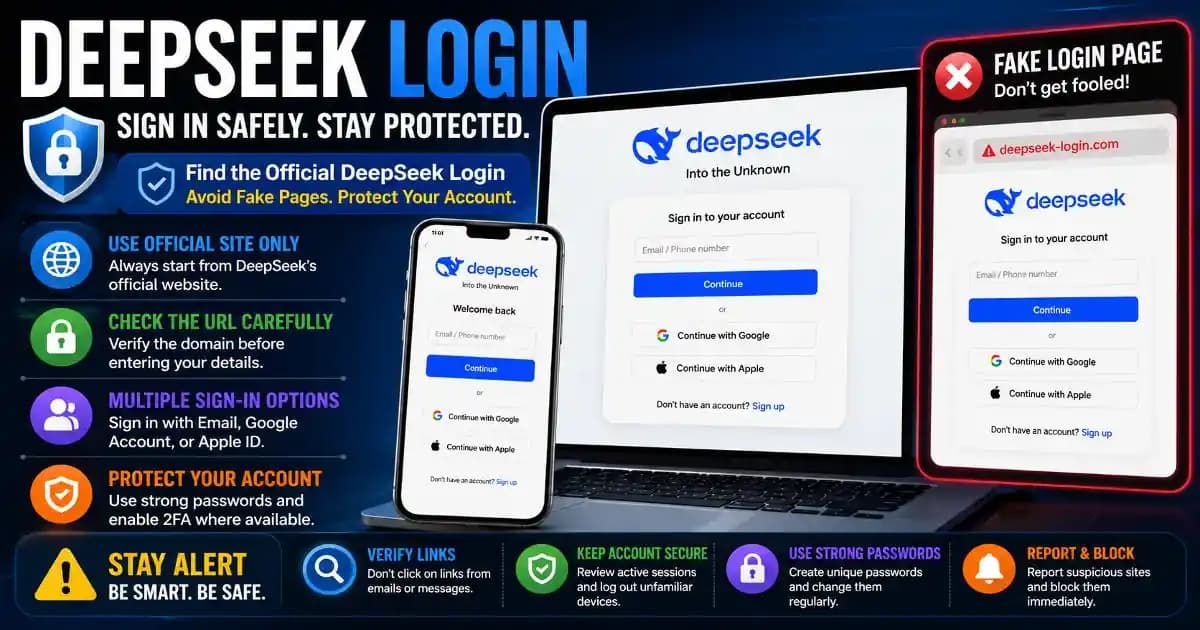
Before entering your password, verification code or other account information, check the domain carefully. A page that copies DeepSeek's logo, colors or interface is not automatically an official DeepSeek login page.
Why DeepSeek Login Searches Can Lead to Confusing Results
Search results for DeepSeek login can include official pages, independent guides, app listings, developer documentation and unrelated websites using the DeepSeek name.
This is especially important because AI tools have become popular targets for impersonation. A fake AI website can look convincing while attempting to collect passwords, verification codes or other account information.
The same principle applies to mobile apps. DeepSeek's own developer documentation has advised users to download the app through official channels rather than relying on unfamiliar download websites.
How to Check a DeepSeek Login Page Before Signing In
Before entering your credentials, pause for a few seconds and inspect the page.
- Check the domain. Make sure you are using an official DeepSeek destination rather than a lookalike domain.
- Check the connection. The page should use HTTPS, but remember that HTTPS alone does not prove a website is legitimate.
- Ignore suspicious advertisements. A sponsored search result or banner does not automatically mean the destination is official.
- Do not enter verification codes into unfamiliar pages. Treat one-time codes as sensitive authentication information.
- Use the official app store. When installing DeepSeek on mobile, verify the publisher and download through the appropriate official store.
The most important habit is simple: if you are unsure about a login page, close it and open the official DeepSeek website manually instead of continuing through the link.
What Is “DeepSeek Into the Unknown”?
If you have searched for DeepSeek Into the Unknown login, the phrase may look like the name of a separate service.
It is actually associated with DeepSeek's own branding. The official DeepSeek website currently uses “Into the Unknown” as a prominent tagline while presenting its web chat, application and API products.
That means a search containing both “DeepSeek” and “Into the Unknown” does not necessarily indicate a separate login service. Users may simply be trying to locate the DeepSeek sign-in page after seeing the phrase in search results or on the website.
DeepSeek Chat Login vs Developer Platform Login
One source of confusion is that DeepSeek serves both ordinary users and developers.
If you want to chat with the AI, you are looking for the normal DeepSeek web or mobile experience.
Developers have a different reason to sign in. The developer platform is where API-related settings, usage information and credentials are managed.
These two experiences should not be confused. If you only want to use DeepSeek as an AI assistant, you do not need to start by searching for API keys or developer documentation.
What If DeepSeek Login Is Not Working?
A failed login does not automatically mean that your account has been compromised.
Login problems can come from temporary service issues, browser problems, incorrect credentials, verification problems or network conditions.
Start with the simplest checks. Confirm that you are using the correct official login page, verify that your internet connection is working, and try the service from an updated browser or the official application.
If you recently changed your password, make sure you are not using an older saved password from your browser or password manager.
Do not download unofficial “DeepSeek login fix” software or browser extensions simply because a website claims they can restore access.
What If You See a Fake DeepSeek Login Page?
If a page claiming to be DeepSeek asks for unusual information, creates extreme urgency, or redirects you through several unrelated domains, leave the page.
Do not enter your password or verification code just because the interface looks professional.
If you already entered credentials into a suspicious page, change the affected password from the official service and review your account security. If the same password was used elsewhere, change it there as well.
This is where your broader account security habits matter. A unique password and strong authentication reduce the damage that can result from a single compromised credential.
How to Use DeepSeek More Safely
Safe AI usage is not only about finding the correct login page.
Users should also think about what they enter into AI services. Avoid placing passwords, authentication codes, private financial information, confidential business documents or unnecessary personal information into an AI chat.
For developers, the same principle applies to API credentials. Never paste a private API key into public code, screenshots, forums or prompts where it could be exposed.
Keep your browser, operating system and security software updated, and be cautious with third-party browser extensions that claim to enhance AI services.
Should You Trust a DeepSeek Login Link Sent by Email?
Be cautious.
A legitimate-looking email can still contain a phishing link. Attackers frequently imitate popular software brands because users are more likely to trust a familiar name.
If an email tells you that your DeepSeek account needs immediate verification, do not rely on the message's button. Open DeepSeek manually through a trusted route and check whether there is actually a problem with your account.
This approach also protects you from a common phishing trick: creating urgency so that you react before inspecting the destination.
The Safest Way to Think About DeepSeek Login
The goal is not to memorize every possible DeepSeek URL.
The better habit is to start from the official DeepSeek website or official application channel, confirm the destination before entering credentials, and treat unexpected login requests with caution.
If you searched for DeepSeek Into the Unknown login, you are most likely looking for access to DeepSeek rather than a separate “Into the Unknown” service.
When a login page looks unfamiliar, stop. Verify the domain. Avoid unofficial downloads. Never give a verification code to a suspicious website.
Those few seconds of verification can make the difference between simply signing into an AI tool and accidentally handing your account details to someone else.
Frequently Asked Questions
What is the official DeepSeek login?
The safest approach is to start from DeepSeek's official website and use its own sign-in option rather than following an unfamiliar third-party link.
What does DeepSeek Into the Unknown mean?
“Into the Unknown” is used as DeepSeek branding on its official website. It does not mean that you need to find a separate service with that name.
Why is my DeepSeek login not working?
Check the official login page, your credentials, browser, network connection and verification method. Avoid downloading unofficial software that claims to fix the problem.
Can a fake DeepSeek login page steal my password?
Yes. A phishing website can imitate a legitimate AI service and attempt to collect usernames, passwords or verification codes. Always verify the domain before signing in.
Is DeepSeek login the same as the DeepSeek API platform?
They are related to the same broader DeepSeek ecosystem, but the normal chat experience and developer platform serve different purposes. Use the chat interface for conversations and the developer platform for API-related work.